

Modern businesses face critical crossroads where outdated infrastructure often consumes over 70% of IT budgets. Legacy system migration provides the essential pathway to escape these high maintenance costs and technical limitations. By moving away from slow, fragile software, organizations can embrace agile environments that foster innovation rather than just maintenance.
This process involves transitioning critical applications and data to modern architectures that support scalability and speed. Whether you pursue a simple transition or a full structural change, successful migration of legacy systems ensures your technology foundation remains robust, secure, and ready for future growth.
Legacy system migration involves moving outdated software applications, data, and infrastructure to modern environments or architectures. This process ensures that businesses no longer struggle with slow performance, frequent bugs, and rigid scaling limitations. Many organizations prioritize legacy application migration to improve operational efficiency and reliability.
While it typically preserves the original architecture, it sets the stage for future growth by enabling basic stability and performance boosts. By executing a strategic legacy to cloud migration, companies replace clunky, high-maintenance tech with agile platforms. This shift allows teams to focus on innovation instead of constant troubleshooting and high maintenance costs.
Modern businesses often find that their growth hits a ceiling due to technical debt and aging infrastructure. A strategic legacy application migration to cloud environments is no longer an option but a survival requirement. Relying on outdated software creates significant operational risks and drains resources that should fuel innovation.
The necessity for migration of legacy systems stems from several critical business drivers:
A successful legacy system migration requires a structured approach to minimize risk and maximize ROI. Using the 6R framework, businesses can determine the most efficient path for each component of their architecture. This strategic clarity ensures that legacy application migration aligns with long-term digital goals rather than just moving problems to a new environment.
The following strategies define the core migration pathways:
You can also check Understanding Legacy Modernization & Its Benefits for Businesses
While both processes aim to upgrade aging infrastructure, they serve different strategic goals. Understanding the distinction helps businesses choose between immediate infrastructure improvements and deep, structural transformations.

Moving away from aging infrastructure presents several hurdles that can disrupt business continuity if not managed correctly. Identifying these risks early allows teams to build a resilient legacy system migration plan.
Legacy systems often store information in inconsistent formats or outdated databases. This makes data migration from legacy systems vulnerable to errors or gaps.
Modern systems are fragile and not always designed for immediate compatibility with new infrastructure. Unplanned interruptions during legacy application migration can halt regular operations.
Outdated software often runs on unsupported platforms with unpatched flaws. A legacy to cloud migration might inadvertently expose these vulnerabilities to the open web.
Employees often feel comfortable with old workflows and might resist adopting new platforms, delaying the ROI of your migration of legacy systems.
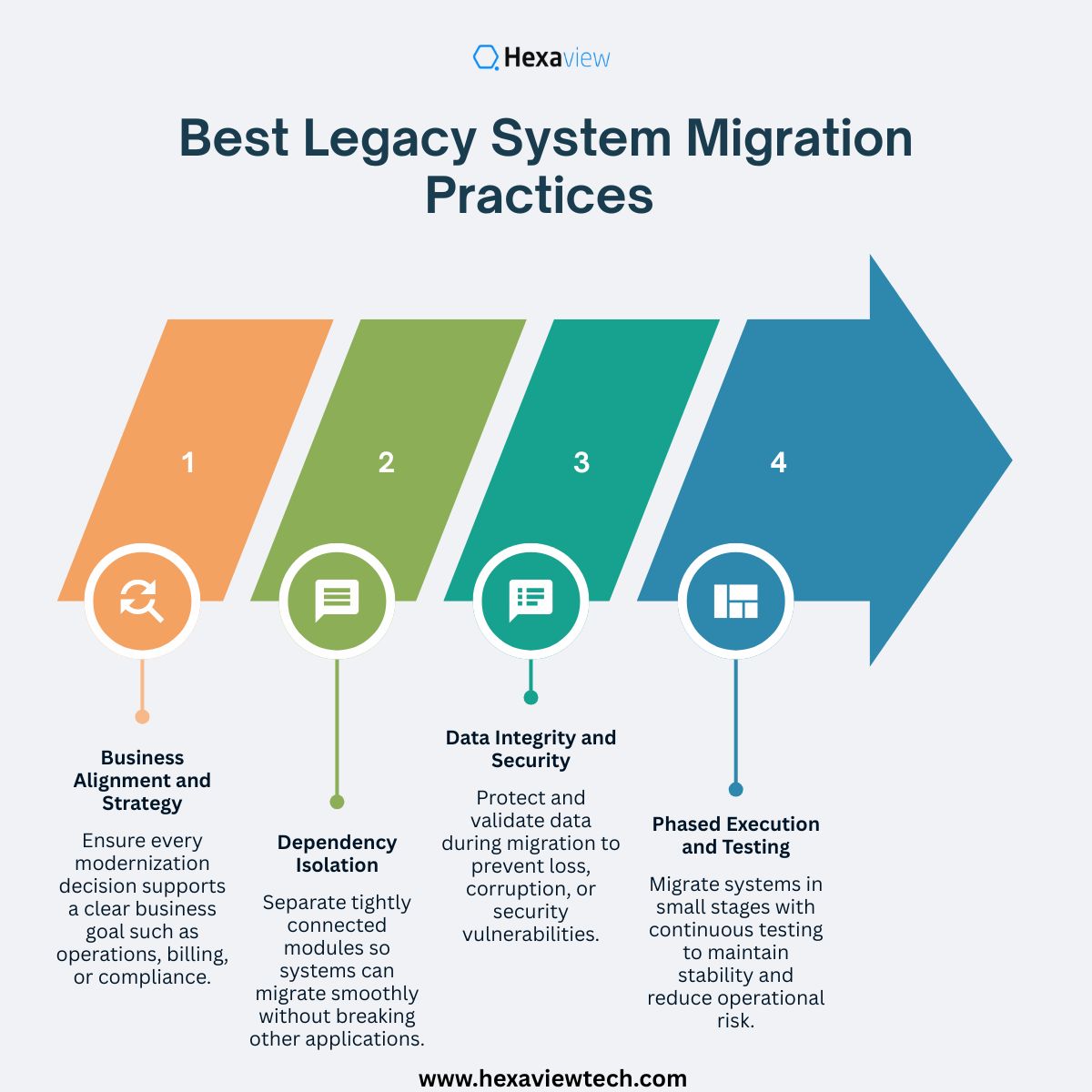
Implementing a successful legacy system migration requires more than just moving files; it demands a disciplined approach to ensure the new environment outperforms the old one. Adhering to industry best practices reduces the risk of project failure and ensures a high return on investment.
Hexaview Technologies employs a sophisticated, business-aligned strategy for legacy system migration, focusing on converting high-maintenance architectures into agile, cloud-ready environments. Their methodology prioritizes risk mitigation and zero-downtime transitions, particularly for highly regulated sectors like BFSI and healthcare where data integrity is paramount.
Hexaview follows a disciplined, multi-stage framework to ensure every legacy application migration delivers measurable performance gains and long-term scalability:
Hexaview’s approach is notably "AI-assisted," utilizing intelligent tools to speed up code conversion while maintaining human-in-the-loop engineering for reliability. Their solutions often result in a 50% reduction in infrastructure costs and up to 60% faster application performance. By exposing legacy functionality through modern APIs, they enable seamless integration with third-party tools, ensuring that the legacy application migration to cloud leads to a truly future-proof digital ecosystem.
Embarking on a legacy system migration is a transformative journey that moves a business from technical stagnation to operational excellence. By addressing technical debt and moving away from fragile, high-maintenance infrastructure, organizations unlock new levels of scalability and performance.
Whether you choose a rapid legacy application migration to cloud or a deep structural rebuild, the result remains a more agile and secure digital foundation. A successful migration of legacy systems ensures your business stays competitive in an increasingly fast-paced market. Ultimately, modernizing your core technology is the most effective way to foster innovation and drive sustainable long-term growth.
A successful legacy system migration reduces high maintenance costs, eliminates technical debt, and improves software performance. It allows businesses to move away from slow, fragile infrastructure and adopt agile, scalable environments that foster innovation.
Yes, provided you follow best practices. A strategic legacy application migration to cloud allows you to implement modern security protocols like Zero Trust and continuous monitoring, which are often impossible to maintain on outdated, unsupported hardware.
The timeline depends on the complexity of the architecture. A simple rehosting might take a few weeks, while a deep legacy application migration involving refactoring or rebuilding can take several months to ensure full stability and performance.
The primary risks are data loss and corruption due to inconsistent formats in old databases. Using automated validation layers and conducting thorough backups before and during the move ensures high data migration from legacy systems integrity.
It shifts IT spending from a high-capital expenditure model to a flexible operational model. By optimizing resources through a legacy application migration to cloud, businesses stop paying for idle server capacity and expensive niche talent required for old code.
It is a strategic roadmap used to categorize the best path for each application. Options include Rehost, Replatform, Refactor, Repurchase, Retain, or Retire, ensuring every part of your migration of legacy systems aligns with business value.
Yes. By using a phased approach and parallel runs, organizations can execute a legacy system migration with zero to minimal disruption. This involves testing the new environment thoroughly before performing the final cutover from the old system.





.svg)



.svg)