
Microsoft Fabric architecture is a unified, SaaS-based analytics architecture. It combines data integration, engineering, warehousing, real-time analytics, and business intelligence into one platform. Everything runs on OneLake, which provides a single storage foundation for all workloads.
Many organizations struggle during adoption. But the platform is rarely the problem. Most challenges happen because teams do not understand how the architecture layers work together before migration or implementation.
A clear architectural strategy improves governance, scalability, and performance. It also helps teams reduce data silos and simplify analytics across the business.
Organizations can use Microsoft Fabric consulting services to design an architecture that aligns with their data, analytics, governance, and business requirements.
Once the architecture is defined, Microsoft Fabric implementation services can help organizations configure, integrate, and deploy the platform across their data environment.
Hexaview helps enterprises design and implement Microsoft Fabric architecture that aligns with business goals. This guide explains the platform, its core layers, and best practices for building a modern data foundation.
Microsoft Fabric architecture is Microsoft's SaaS platform built around many data fabric principles. It provides a complete analytics environment rather than just connecting data. The platform includes data integration, engineering, warehousing, real-time analytics, data science, and Power BI. All workloads share OneLake as their common storage layer.
The biggest difference with data fabric architecture is scope. A traditional data fabric focuses on connecting and governing data. Microsoft Fabric architecture also provides built-in compute, analytics, artificial intelligence, and reporting.
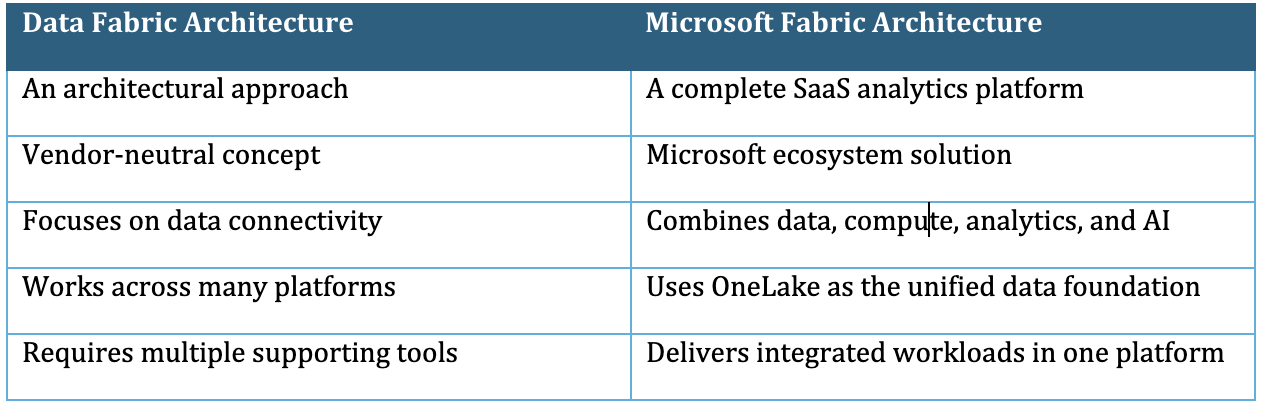
Understanding this difference helps organizations choose the right strategy for modern analytics and digital transformation.
Every component in Microsoft Fabric architecture serves a specific purpose. Together, they create a unified analytics platform. Each workload shares the same storage, governance, and security foundation. This design removes silos and simplifies enterprise data management.
OneLake is the heart of Microsoft Fabric architecture. It provides one shared storage layer for every workload. All teams work from the same trusted data foundation.
OneLake stores data in the open Delta Parquet format. This format supports high-performance analytics and broad compatibility. It also allows structured and unstructured data to exist together.
OneLake shortcuts reduce unnecessary data duplication. Teams can reference existing datasets without creating extra copies. This approach improves governance and lowers storage costs. OneLake creates the foundation for a scalable Microsoft Fabric lakehouse architecture.
Data Factory moves data from different sources into the Fabric environment. It connects databases, cloud platforms, applications, APIs, and files. This workload simplifies enterprise data integration.
Data Factory includes Dataflow Gen2 and data pipelines. Dataflow Gen2 prepares and transforms data with low-code tools. Pipelines automate data movement and scheduling across systems.
Data Factory reduces manual work and improves data reliability. It ensures trusted information reaches OneLake efficiently. This component serves as the starting point for most Microsoft Fabric architecture implementations.
Synapse Data Engineering prepares large datasets for analytics and artificial intelligence. It uses Apache Spark to process massive data volumes quickly. Engineers can transform raw information into trusted datasets.
The workload supports notebooks for Python, Spark SQL, Scala, and other languages. Fabric also provides managed Spark runtimes for simplified development. Teams spend less time managing infrastructure.
This component powers complex data transformations and advanced processing. It prepares high-quality data for reporting, machine learning, and business analytics within Microsoft Fabric architecture.
Synapse Data Warehouse provides enterprise-grade SQL analytics. It helps organizations analyze structured business data efficiently. Users can work with familiar SQL tools and queries.
The warehouse integrates directly with OneLake. It supports Direct Lake experiences to enable faster reporting in Power BI. Data remains in its original location without unnecessary movement.
This workload delivers strong performance for enterprise reporting. It also supports consistent governance across analytical workloads. Many businesses rely on this layer for operational and executive reporting.
Modern businesses generate continuous streams of information. Synapse Real-Time Intelligence analyses this data as events happen. It supports rapid decision-making across many industries.
The workload processes data from IoT devices, applications, sensors, and event streams. Teams can monitor live business operations through interactive dashboards. Alerts help users respond to changing conditions quickly.
Real-time analytics improves visibility across critical operations. It also complements historical reporting inside Microsoft Fabric architecture.
Power BI is the reporting and visualization layer of Microsoft Fabric architecture. It transforms enterprise data into interactive dashboards and reports. Business users can explore trusted information independently.
Power BI uses semantic models to create consistent business definitions. Everyone works from the same metrics and calculations. This approach improves reporting accuracy across departments.
Direct Lake enables Power BI to analyse OneLake data efficiently. Users experience faster reporting with minimal data movement. Power BI makes enterprise analytics accessible to both technical and business teams.
The Data Science workload supports advanced analytics and machine learning. Data scientists can explore, prepare, and train models inside Fabric. Everything remains connected to the shared data foundation.
The workload supports notebooks for Python and popular data science libraries. Teams can build predictive models using trusted enterprise datasets. Collaboration becomes easier because data stays within OneLake.
This integrated approach reduces complexity. Organizations can move from data preparation to artificial intelligence without changing platforms.
Fabric Databases bring operational and analytical workloads closer together. They support SQL databases and Azure Cosmos DB within the Fabric ecosystem. Businesses can manage transactional and analytical data more efficiently.
Developers can build applications using familiar database technologies. Analysts can access operational data for reporting and insights. This reduces delays between business transactions and analytics.
The shared platform improves consistency across enterprise data. It also simplifies governance and security for different database workloads.
Data Agents and Copilot introduce conversational experiences into Microsoft Fabric architecture. Users can ask business questions using natural language. Artificial intelligence converts questions into meaningful insights.
These tools work with trusted organizational data instead of public information. Responses follow existing security and governance policies. This protects sensitive business information.
Business users can explore dashboards, reports, and datasets more easily. Technical teams also save time when analyzing complex information. AI becomes a practical assistant for everyday analytics instead of a separate tool.
Together, these components create a connected analytics ecosystem. Every workload share OneLake, governance, identity, and security. This unified design makes Microsoft Fabric architecture easier to manage, scale, and modernize than traditional data platforms.
The Microsoft Fabric Lakehouse architecture uses OneLake as its central data foundation. Every workload reads and writes data from this shared storage.
OneLake is a tenant-wide data lake built into Microsoft Fabric architecture. It stores data using the open Delta Parquet format. This format supports fast analytics and broad compatibility.
Teams no longer need multiple copies of the same data. Instead, OneLake uses shortcuts to reference data across different locations. This approach reduces storage costs and improves consistency.
The Lakehouse combines the flexibility of a data lake with the performance of a data warehouse. It supports structured, semi-structured, and unstructured data within a single environment.
Business users can query data with familiar SQL tools. Data engineers can process large datasets using Apache Spark. Analysts can build reports without moving data between platforms.
Direct Lake makes reporting even faster. Power BI reads data directly from OneLake. This process reduces delays caused by traditional data imports.
All workloads share the same storage, security, and governance policies. This design simplifies data management across the organization.

This unified design removes data silos and supports collaboration across technical and business teams.
At Hexaview, we often see organizations duplicate data during early implementations. Many teams create separate storage for different workloads. This approach increases costs and creates governance challenges.
Our Microsoft Fabric Consultants recommend using OneLake shortcuts whenever possible. A single trusted data foundation delivers better performance, stronger governance, and easier long-term management. This approach helps businesses unlock the full value of Microsoft Fabric Lakehouse architecture.
Understanding the data flow makes Microsoft Fabric architecture easier to understand. Every workload connects through OneLake, creating a unified analytics platform.
The journey begins with data ingestion. Data Factory collects information from databases, cloud applications, APIs, files, ERP systems, and IoT devices. Data pipelines and Dataflow Gen2 automate this process.
The collected data is stored in OneLake. OneLake becomes the central location for every workload. Teams work with one trusted copy instead of multiple datasets.
Next, Synapse Data Engineering transforms the raw data. Apache Spark notebooks clean, enrich, and prepare information for analytics. Business rules and quality checks are also applied during this stage.
The processed data moves into a Lakehouse or data warehouse. The Lakehouse supports flexible analytics across different data types. The warehouse organizes structured data for SQL reporting and business intelligence.
Power BI then connects through Direct Lake mode. Reports read data directly from OneLake without importing large datasets. This approach improves performance and keeps dashboards up to date.
Finally, Copilot and Data Agents make analytics more accessible. Users ask questions using natural language instead of complex queries. The platform returns insights using trusted enterprise data while following existing security policies.
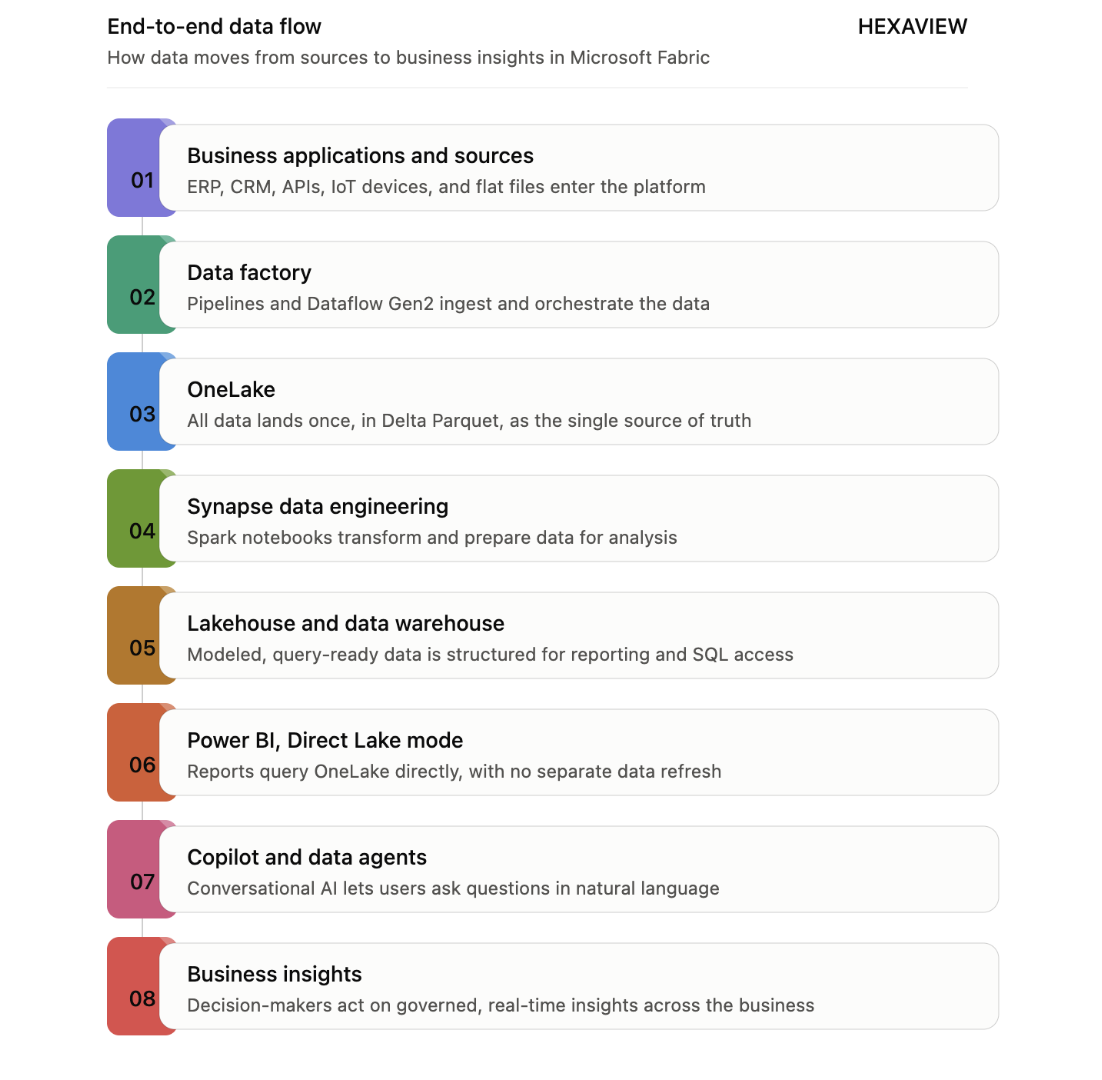
This connected workflow removes unnecessary data movement. It also helps organizations deliver faster, more secure, and more scalable analytics using the Microsoft Fabric architecture.
Security and governance are essential parts of Microsoft Fabric architecture. They protect business data while supporting collaboration across teams. A strong governance strategy also simplifies compliance and reduces operational risks.
Security becomes more effective when planned from the beginning. Adding governance after deployment often creates unnecessary complexity. Early planning also reduces future migration and compliance challenges.
At Hexaview, governance is often the biggest challenge during enterprise Fabric implementations. Many organizations focus on workloads before defining security policies. This approach usually delays deployment and increases project risk.
Hexaview follows a governance-first implementation strategy. We establish identity, access controls, and data policies before expanding workloads. This approach creates a secure foundation for long-term growth. It also helps businesses gain the full value of Microsoft Fabric architecture without compromising compliance or performance.
Many organizations still use traditional data platforms. These environments often rely on separate tools for storage, integration, reporting, and governance. Managing these systems increases operational complexity over time.
Microsoft Fabric architecture takes a different approach. It brings data, analytics, artificial intelligence, and governance into one unified platform. Every workload shares the same storage and security foundation. This design reduces data duplication and simplifies management.
The comparison below highlights the key differences between traditional data platforms and Microsoft Fabric architecture.
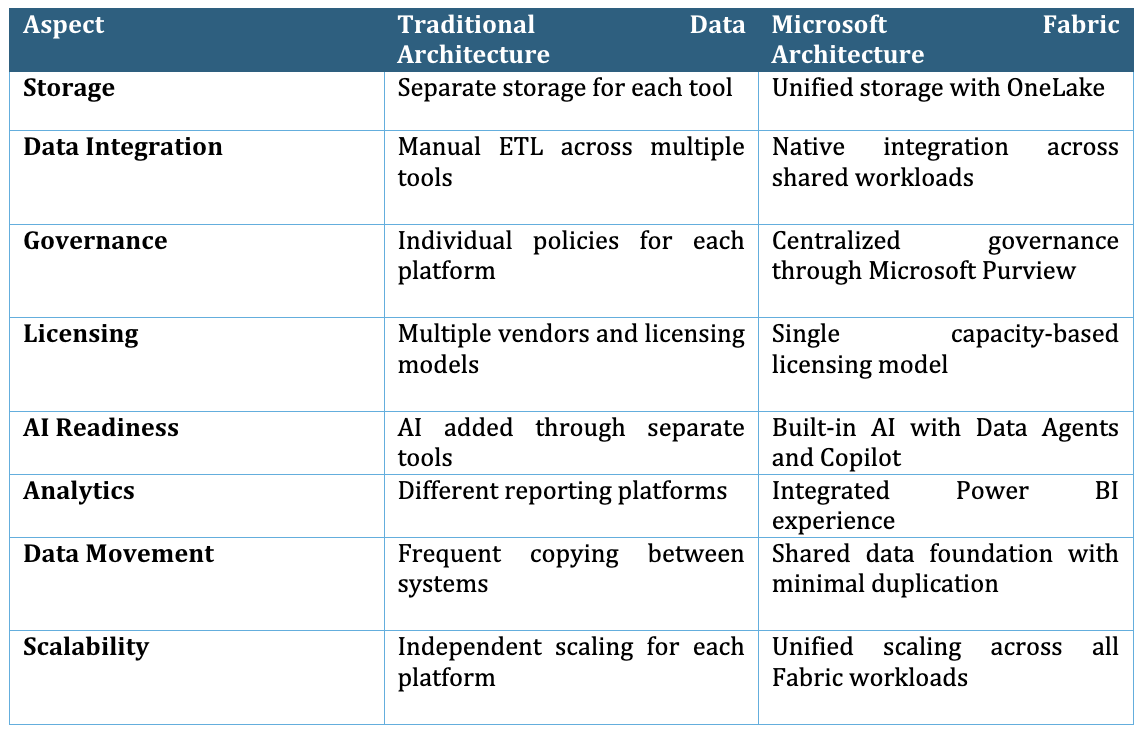
For organizations planning modern analytics, Microsoft Fabric architecture offers a simpler, more connected foundation. It reduces platform complexity while improving governance, collaboration, and AI readiness.
Many organizations invest in Microsoft Fabric architecture with high expectations. However, poor planning often limits the platform's full potential. Avoiding common mistakes leads to faster adoption and better long-term results.
Some teams view Fabric as only a storage platform. They ignore shared compute, analytics, and governance capabilities. Capacity planning also receives little attention. This mistake affects performance as data volumes continue to grow.
Many organizations create workspaces without business ownership. This approach makes collaboration and governance more difficult. Domain-based workspaces support data mesh principles and improve accountability. They also make security easier to manage as environments expand.
Governance should never become an afterthought. Some businesses focus on workloads before defining access policies and data standards. This creates security risks and inconsistent reporting. Early governance simplifies compliance and future growth.
Many organizations migrate existing pipelines without redesigning them. This lift-and-shift approach carries old problems into a modern platform. Legacy workflows often fail to use OneLake, Direct Lake, or shared workloads effectively.
At Hexaview, we help organizations avoid these common implementation challenges. Our architects review existing platforms before migration begins. We design scalable Microsoft Fabric architecture around business goals, governance, and future growth. This approach reduces technical debt and helps businesses gain long-term value from their investment.

A successful Microsoft Fabric architecture depends on careful planning. The following proven practices improve performance, governance, and long-term scalability.
Different workloads require different levels of compute and storage. Estimate business needs before selecting Fabric capacity. Regular monitoring helps organizations adjust resources as usage grows.
Direct Lake allows Power BI to read data directly from OneLake. Reports load faster because large datasets remain in place. This approach also reduces unnecessary data movement and refreshing delays.
Development teams should use Git integration from the beginning. Version control improves collaboration across developers and data engineers. CI/CD pipelines also make deployments more reliable and easier to manage.
Organize workspaces around business domains instead of departments alone. Each domain should have clear ownership and security policies. This structure supports growth while maintaining strong governance across the organization.
Monitoring should begin as soon as workloads become active. Track capacity usage, pipeline performance, query execution, and system health. Early visibility helps teams identify issues before they affect business operations.
At Hexaview, these practices guide every Microsoft Fabric architecture implementation. We focus on performance, governance, and operational excellence from the first project phase. This approach helps organizations build a secure, scalable, and future-ready analytics platform.
Building Microsoft Fabric architecture requires more than deploying new technology. It demands a clear strategy, strong governance, and architecture designed for future growth. Hexaview helps enterprises achieve these outcomes through end-to-end Microsoft Fabric consulting services.
Our engagement begins with an architecture assessment. We evaluate your existing data platform, workloads, integration patterns, and business objectives. This assessment identifies migration risks, performance gaps, and modernization opportunities.
Next, our experts create a detailed implementation blueprint. The blueprint defines OneLake design, workspace strategy, security, governance, data integration, and workload architecture. Every recommendation aligns with your business and technical requirements.
During implementation, Hexaview manages data migration, pipeline modernization, workload deployment, and Power BI integration. We also establish governance frameworks using Microsoft Entra ID, Microsoft Purview, and Role-Based Access Control.
Our support continues after deployment. We optimize capacity, improve performance, monitor workloads, and help teams adopt new Fabric capabilities as business needs evolve.
Whether you are replacing legacy analytics platforms or building a modern data ecosystem, Hexaview provides practical guidance at every stage. Our proven engagement model covers assessment, architecture blueprint, implementation, and continuous optimization.
Talk to Hexaview's Fabric architects to discuss your data modernization goals and discover how a well-designed Microsoft Fabric architecture can accelerate analytics, AI, and business growth.
1. What is Microsoft Fabric architecture?
Microsoft Fabric architecture is a unified SaaS analytics platform built on OneLake. It combines data integration, engineering, warehousing, real-time analytics, data science, and Power BI. All workloads share the same storage, governance, and security foundation.
2. What is data fabric architecture vs. Microsoft Fabric architecture?
Data fabric architecture refers to a vendor-neutral architectural approach for connecting and governing data. Microsoft Fabric architecture is Microsoft's SaaS platform that applies to these principles. It also includes built-in analytics, AI, and business intelligence capabilities.
3. What is Microsoft Fabric Lakehouse architecture?
The Microsoft Fabric Lakehouse architecture combines the flexibility of a data lake with the structure of a data warehouse. It stores data in OneLake using Delta Parquet. Users can analyze the same data with Spark, SQL, and Power BI.
4. Is Microsoft Fabric a PaaS or SaaS?
Microsoft Fabric is a Software-as-a-Service platform. Microsoft manages infrastructure, updates, and platform services. Organizations can focus on analytics rather than on managing environments.
5. What are the core components of Microsoft Fabric?
The main components include OneLake, Data Factory, Synapse Data Engineering, Data Warehouse, Real-Time Intelligence, Power BI, Data Science, Fabric Databases, and Copilot. Together, they create a connected analytics ecosystem.
6. How does OneLake work?
OneLake is the central storage layer in the Microsoft Fabric architecture. Every workload reads and writes data from this shared foundation. Shortcuts reduce data duplication and simplify governance.
7. Is Microsoft Fabric the same as a data warehouse?
No. Microsoft Fabric is a complete analytics platform. A data warehouse is only one workload within the platform. Fabric also includes data integration, engineering, AI, real-time analytics, and reporting.
8. What is Direct Lake mode?
Direct Lake is a Power BI storage mode in Microsoft Fabric. It allows reports to query data directly from OneLake. This approach improves performance while reducing data movement.
9. How secure is Microsoft Fabric?
Microsoft Fabric provides enterprise-grade security. It supports Microsoft Entra ID, Role-Based Access Control, Microsoft Purview, sensitivity labels, and Private Link. These features help organizations protect sensitive business data.
10. What's the difference between Microsoft Fabric and Azure Synapse?
Azure Synapse offers separate analytics services that require more platform management. Microsoft Fabric architecture brings these capabilities into one SaaS environment. This approach simplifies deployment, governance, and collaboration.
11. Does Microsoft Fabric replace Power BI Premium?
Microsoft Fabric includes Power BI capabilities within its capacity model. Many organizations can transition from Power BI Premium to Fabric capacities. The best approach depends on existing licensing and business requirements.
12. How long does a Microsoft Fabric implementation take?
Implementation timelines depend on data volume, workloads, and migration complexity. Smaller projects may finish within weeks. Enterprise deployments usually require several months. Hexaview helps organizations plan realistic timelines through architecture assessments and phased implementation.
13. What industries use Microsoft Fabric?
Many industries use Microsoft Fabric, including banking, healthcare, retail, manufacturing, insurance, telecommunications, and logistics. The platform supports secure analytics, real-time insights, and AI across different business environments.
14. Can organizations migrate existing data platforms to Microsoft Fabric?
Yes. Most organizations can migrate from legacy warehouses, Azure Synapse, SQL Server, or other analytics platforms. A detailed architecture review reduces migration risks. Hexaview helps businesses modernize workloads while maintaining security, governance, and business continuity.






.svg)


.svg)