
Hexaview Technologies specializes in migrating enterprise data environments to Microsoft Fabric — from Azure Synapse Analytics, Databricks, Azure Data Factory, SQL Server, and Alteryx. Every migration is planned around live reporting schedules, with a staged parallel operation approach that eliminates downtime risk and ensures no reports break mid-transition.
With 20+ certified Microsoft Fabric experts and a migration methodology built specifically for regulated enterprises, Hexaview takes organizations from their current data environment to a fully governed Fabric estate — with the first migrated workload live in 6 to 10 weeks and zero disruption to business-critical reporting.

Azure Synapse Analytics is an active Microsoft service. The case for migrating to Microsoft Fabric is not about forced retirement — it is about where Microsoft is investing, where new platform capabilities are being built, and what organizations will be able to do in Fabric that they cannot do in Synapse today or in the future.
Microsoft Fabric is Microsoft's next-generation unified data platform. New capabilities — Lakehouse architecture, Direct Lake mode for Power BI, Real-Time Intelligence, OneLake unified storage and governance, and Copilot for data — are being built and released in Fabric. These capabilities are not available in Azure Synapse Analytics and are not being backported to it. Organizations that remain on Synapse will access only the capabilities that exist in Synapse today. Organizations that migrate to Fabric gain access to a development roadmap that is receiving active investment.
Azure Synapse Analytics works in combination with other Azure services — Azure Data Lake Storage for raw storage, Azure Data Factory for ingestion pipelines, Power BI Premium for reporting, and separate governance tooling for lineage and access control. Microsoft Fabric brings all of these together on a single platform with a shared governance model, a single storage layer in OneLake, and unified workspace management. For organizations running a Synapse environment today, migration to Fabric typically reduces the number of separate tools being licensed, maintained, and governed.
Power BI reports connected to Synapse SQL pools require a scheduled import refresh cycle — data is periodically copied into Power BI and the report reflects the state of data at the last refresh. Power BI in Microsoft Fabric uses Direct Lake mode, which reads data directly from OneLake without a scheduled import refresh. Reports reflect current data without a refresh delay. For organizations where the gap between data arriving and reports reflecting that arrival is a business problem, Direct Lake mode resolves it without additional tooling.
A well-staged migration from Synapse to Fabric — with a parallel environment, structured workload validation, and cutover rehearsal — requires planning time. Organizations that begin migration planning at their own pace can stage the transition around live reporting schedules, validate each workload before cutover, and avoid compressing the process under deadline pressure. The migration assessment takes 2 to 3 weeks and produces a funded roadmap. Organizations can understand their full migration scope and cost before committing any migration budget.
Access to Lakehouse, Direct Lake Power BI, Real-Time Intelligence, and Copilot — capabilities not available in Synapse
Unified platform: storage, ingestion, analytics, and reporting governed from one workspace
Reduced tooling footprint — Fabric consolidates capabilities that currently require separate licensed services
A platform receiving active Microsoft investment and feature development
Native sensitivity labels, data lineage, and audit logging in OneLake for regulated data environments
Commission a migration assessment to map all Synapse components to their Fabric equivalents before committing budget
Inventory all live Power BI reports and their Synapse data dependencies — this mapping drives the cutover phasing
Identify which Synapse components your organization actually uses: dedicated SQL pools, Spark pools, Synapse Pipelines, Synapse Link
Evaluate the Databricks-to-Fabric decision separately if Databricks is also in use — the two decisions are independent
Set a planning timeline that allows a full parallel migration period rather than a compressed cutover
A five-phase migration methodology built around live reporting schedules. No workload is decommissioned from Synapse until its equivalent on Fabric has been fully tested in a parallel environment and signed off by the data team.
Weeks 1 to 3
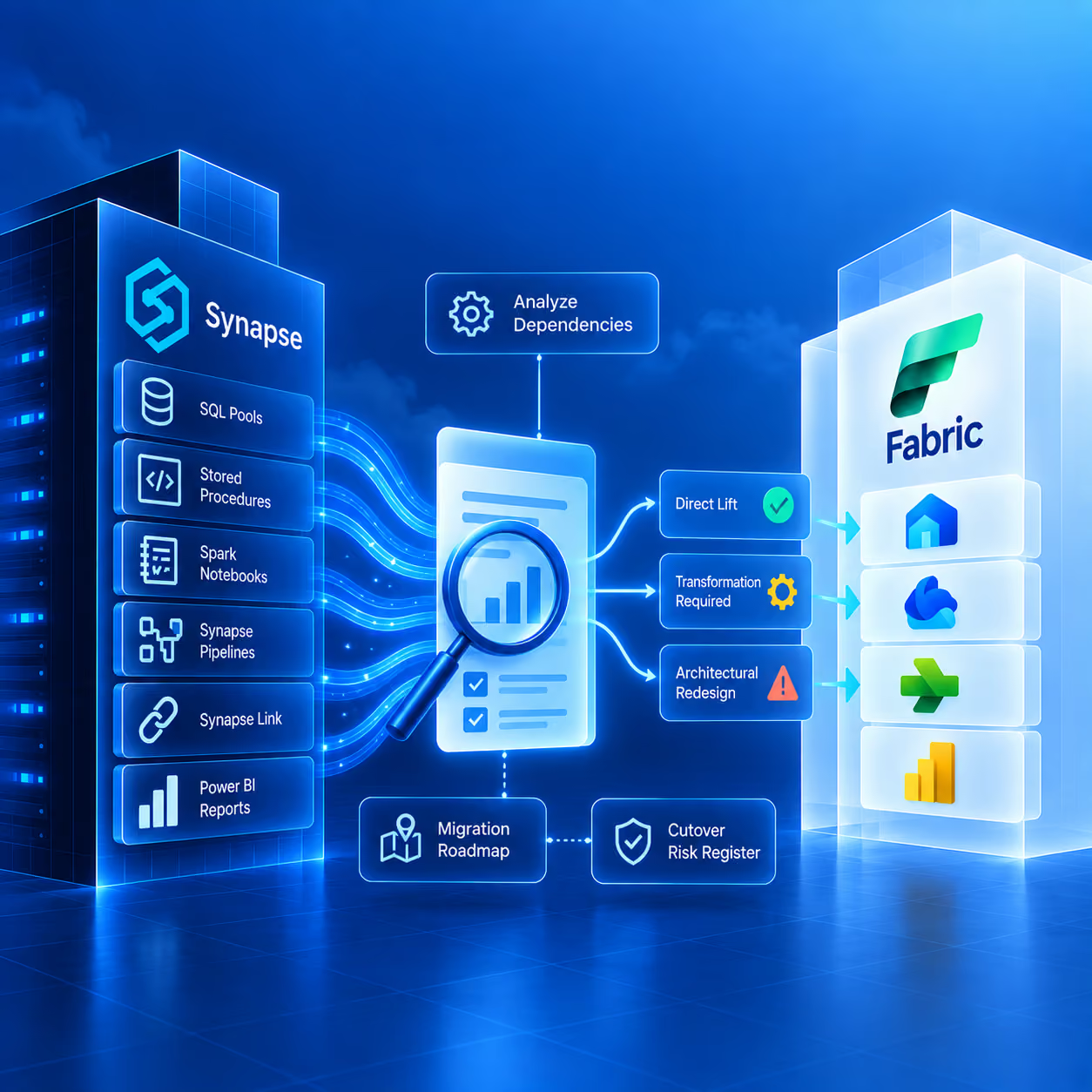
Hexaview audits the full Synapse environment: dedicated SQL pool schemas, stored procedures, Spark notebooks, Synapse Pipeline configurations, Synapse Link connections, and every Power BI report's data dependencies. Each item is mapped to its Fabric equivalent and classified by migration complexity — direct lift, transformation required, or architectural redesign. This phase produces the funded migration roadmap and the cutover risk register before any Fabric infrastructure spend is committed.
Deliverables: Synapse asset inventory, Fabric equivalent mapping, Reporting dependency map, Migration complexity classification, Funded roadmap and cost estimate, Cutover risk register
Weeks 3 to 6
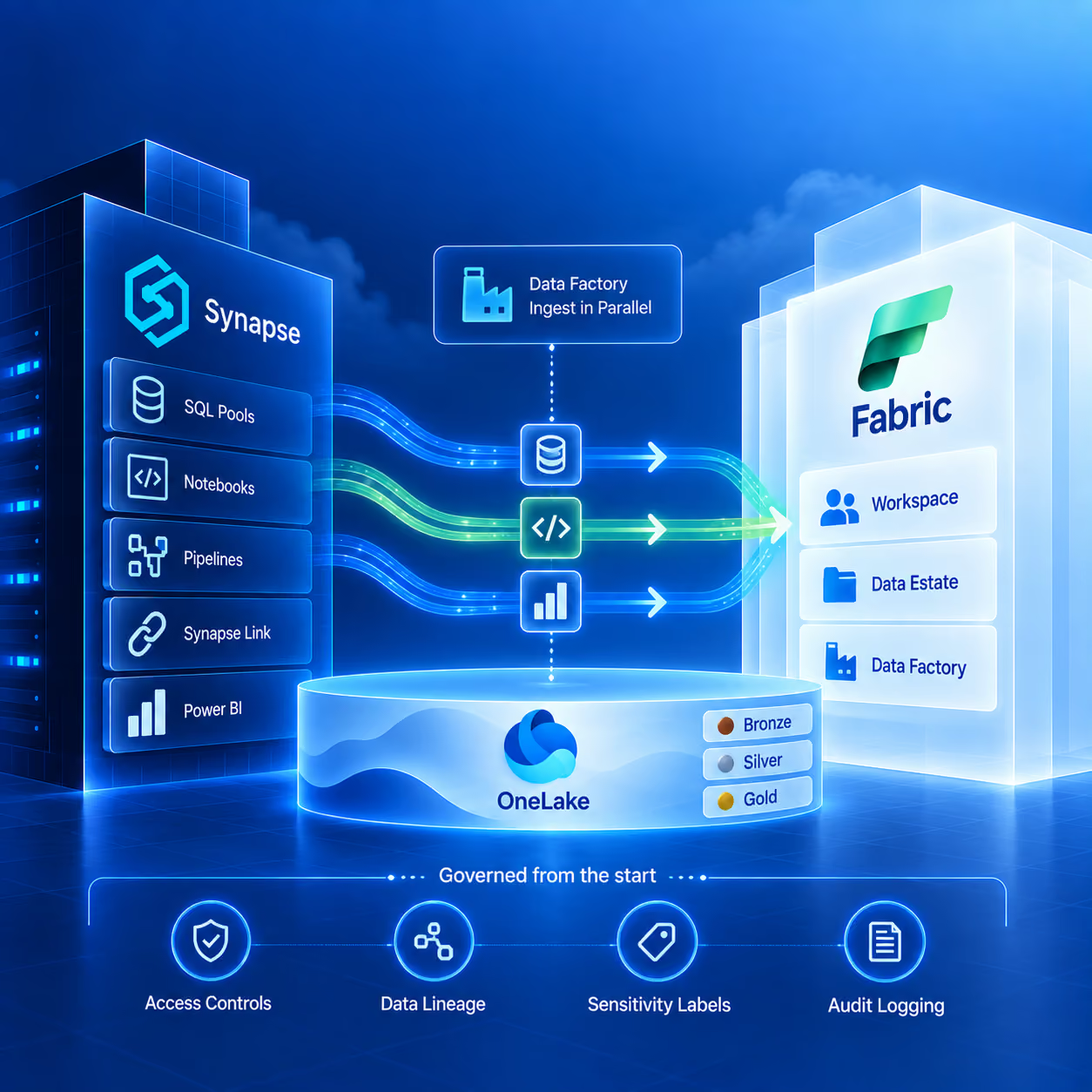
Hexaview configures the Fabric workspace, OneLake governance zones, and the initial data estate structure alongside the existing Synapse environment. The parallel environment is governed from the start: access controls, data lineage, sensitivity labels, and audit logging are configured at setup. Data Factory pipelines begin ingesting into Fabric in parallel with Synapse.
Deliverables: Fabric workspace configured, OneLake governance policies live, Parallel data pipelines ingesting, Fabric environment running alongside Synapse
Weeks 5 to 10
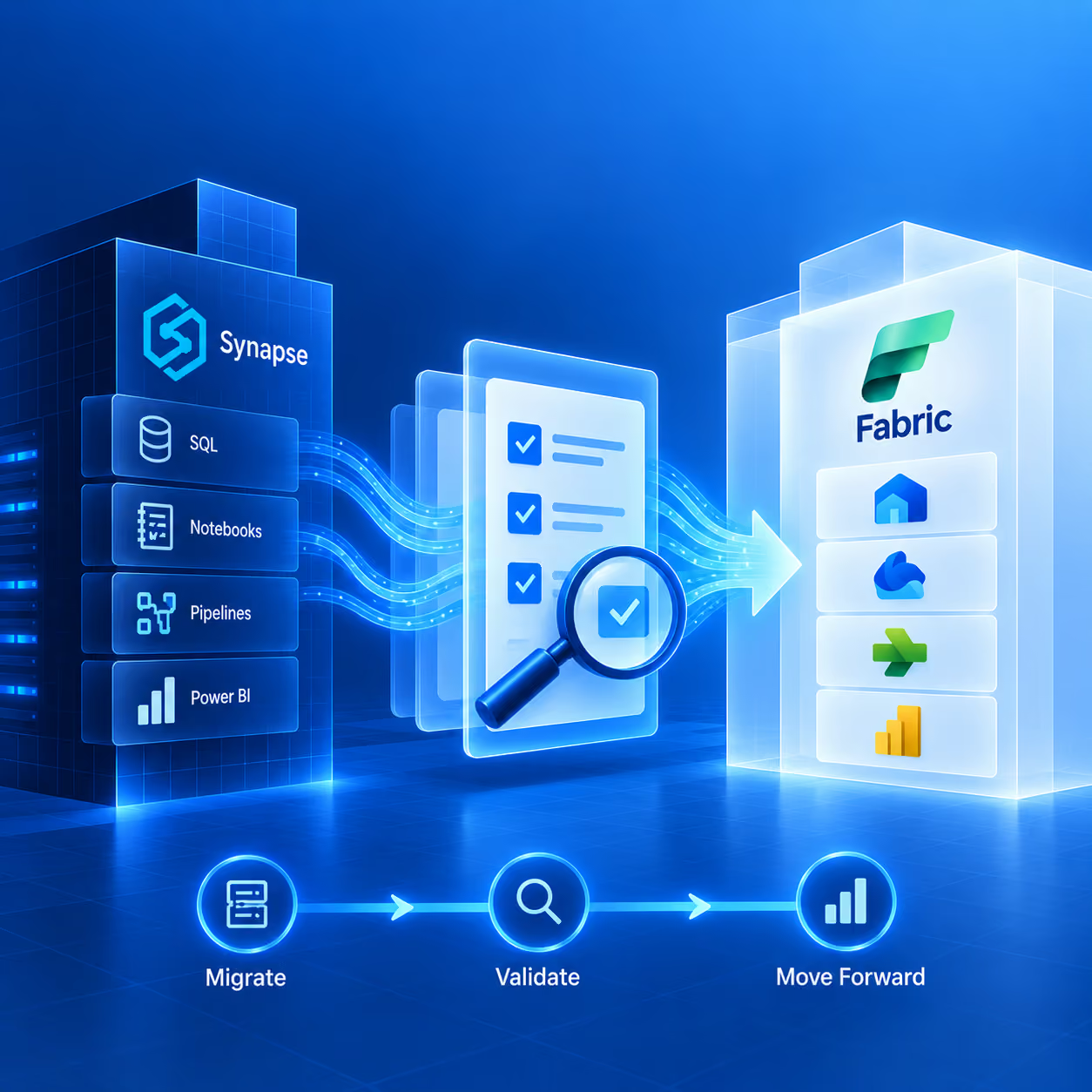
Workloads are migrated in order of risk, from lowest to highest. Non-critical analytical workloads and historical data pipelines move first, allowing the team to validate Fabric behavior and performance against production data before migrating business-critical reporting. Dedicated SQL pools are migrated to Fabric Data Warehouse using T-SQL compatibility. Spark notebooks are migrated to Fabric Lakehouse Spark. Synapse Pipelines are rebuilt in Data Factory within Fabric.
Deliverables: Non-critical workloads live on Fabric, Spark pipeline equivalents tested, Data Factory pipelines operational, Historical data validated on Fabric
Critical Rule: No Synapse workload is decommissioned until its Fabric equivalent has been tested with production-representative data and signed off by the data or analytics lead responsible for that reporting domain.
Weeks 8 to 12
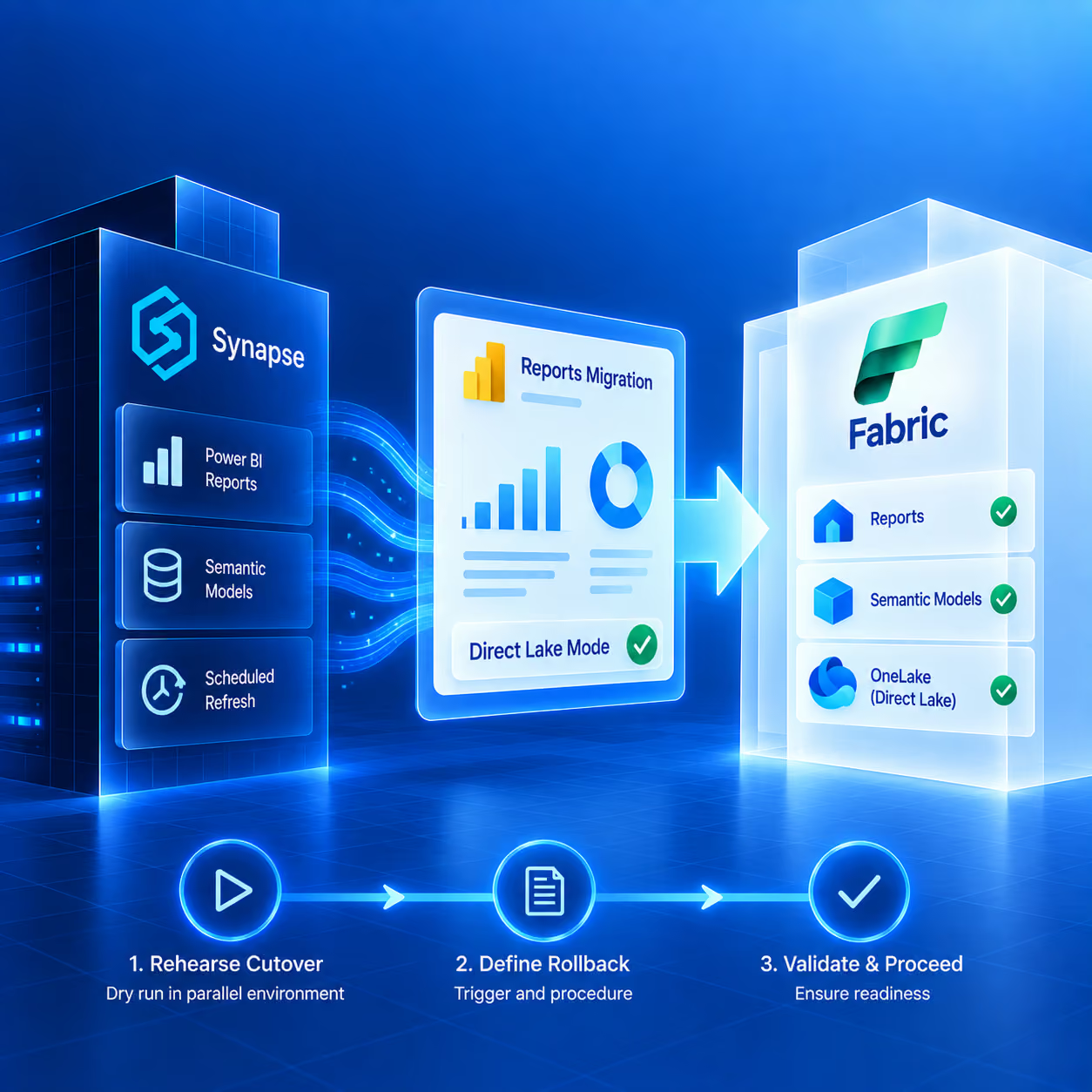
Power BI reports are migrated to Direct Lake mode on Fabric, eliminating scheduled import refresh delays. The cutover sequence is rehearsed: a dry run of the full production cutover is executed in the parallel environment. The rollback trigger and procedure are defined and documented before the rehearsal.
Deliverables: Power BI reports migrated to Direct Lake, Cutover rehearsal completed, Rollback procedure documented, Cutover date agreed with data team
Week 12 onwards
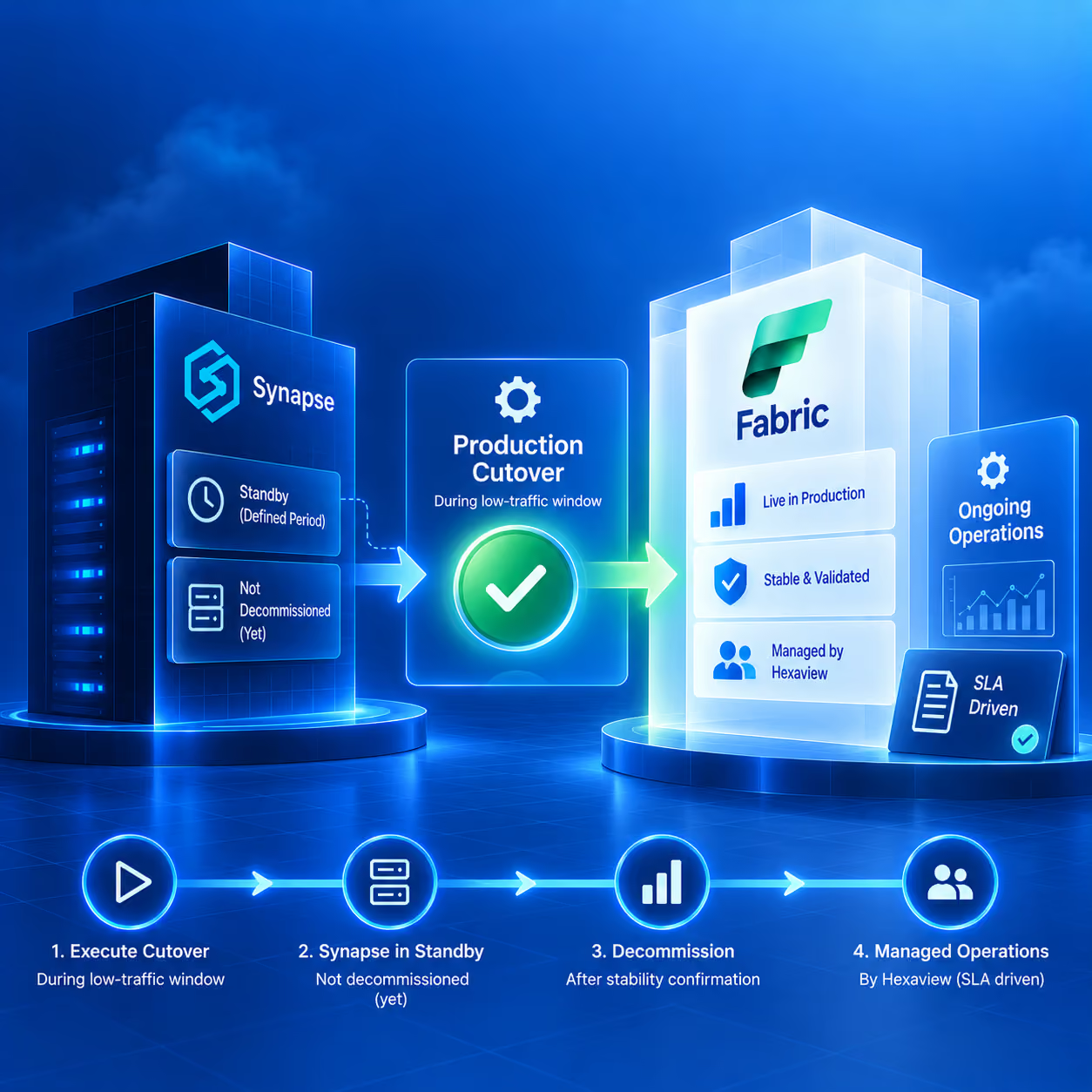
Production cutover is executed during a pre-agreed low-traffic window. The Synapse environment remains in standby — not decommissioned — for a defined stabilisation period. Once confirmed stable under production load, Synapse is decommissioned. Hexaview's managed service then operates the Fabric environment under a defined SLA.
Deliverables: Production cutover completed, Synapse in standby for stabilisation period, Synapse decommissioned after sign-off, Managed service SLA activated, 90-day post-cutover review scheduled
Databricks to Microsoft Fabric: When the Migration Makes Sense — and When It Does Not
Honest Positioning: Hexaview has delivered Microsoft Fabric implementations for organizations that migrated from Databricks and for organizations that chose to keep Databricks for their ML workloads while moving their governed analytics and reporting layer to Fabric. Both are valid outcomes. The migration decision should be driven by the workload profile and governance requirements, not by a vendor's commercial preference. Hexaview's readiness assessment includes a workload compatibility review before any migration commitment is made.
The most common failure mode in a data migration is cutting over to a new platform before the reporting dependencies on the legacy system have been fully identified and reproduced. Hexaview's zero-downtime approach eliminates this risk through a structured parallel operation period.
Before a single workload is migrated, Hexaview maps every Power BI report, every scheduled dataset refresh, every analytical pipeline, and every downstream system that reads from the current data environment. Each dependency is tagged with its business owner, refresh schedule, and criticality level.
Microsoft Fabric is configured and populated with production-representative data while the legacy environment continues to operate normally. Nothing changes for the business during environment build — the migration work is invisible to end users until cutover day.
Each migrated workload is validated against production data in the Fabric parallel environment before it is used in a production context. No workload passes validation without sign-off from its data owner.
The production cutover sequence is rehearsed in the parallel environment before execution. The rollback trigger — the specific condition under which the cutover is reversed and the legacy system is restored — is agreed and documented before the rehearsal begins.
The production cutover is executed during the window identified as lowest-risk for live reporting — typically overnight or over a weekend, aligned to the refresh schedules of business-critical reports. The legacy environment remains in standby during the stabilization period. The legacy system is decommissioned only after the data team confirms stability under production load.
Guarantee: The legacy environment is never decommissioned before the Fabric environment has operated under production load, with production data, for a defined stabilization period — and before the data team responsible for each business-critical report has confirmed the numbers are correct in Fabric. This rule is not negotiable based on timeline pressure.
In addition to Synapse and Databricks migrations, Hexaview delivers three further migration services as named, standalone offerings. These cover organizations whose current environments include Azure Data Factory pipelines, SQL Server data warehouses, or Alteryx analytics workflows — each of which has a specific Fabric migration path and a dedicated delivery methodology.
Named Migration Service
Organizations migrating to Microsoft Fabric who have existing Azure Data Factory investment do not need to rebuild their ingestion layer from scratch. Data Factory is a native workload within Microsoft Fabric. Hexaview delivers ADF-to-Fabric migration as a named service that preserves pipeline logic and connection configurations while consolidating ingestion into the Fabric environment.
What Hexaview does in an ADF migration:
Timeline: Standalone ADF migration projects typically complete in 4 to 8 weeks depending on pipeline volume and complexity. For organizations doing a broader Fabric implementation, ADF pipeline migration is delivered within Phases 2 and 3 of the implementation roadmap (Weeks 3 to 10).
Outcome: A unified ingestion layer inside Fabric Data Factory that replaces standalone ADF without losing pipeline logic, connection configurations, or downstream data dependencies.
Named Migration Service
Microsoft SQL Server on-premises data warehouses migrate to Microsoft Fabric Data Warehouse using T-SQL compatibility. Hexaview delivers SQL Server to Microsoft Fabric migration as a named service, covering the full migration path from schema and stored procedure migration through to Power BI report reconfiguration and post-cutover managed service.
What Hexaview does in a SQL Server migration:
Timeline: SQL Server migrations typically complete in 6 to 16 weeks depending on database size, stored procedure volume, and number of Power BI reports with SQL Server dependencies. Timeline is confirmed after the migration assessment.
Outcome: A fully governed Fabric Data Warehouse that eliminates the maintenance overhead of an on-premises SQL Server warehouse, with Power BI reports on Direct Lake mode replacing scheduled refresh.
Named Migration Service
For most data preparation, ETL, and scheduled reporting workflows, Microsoft Fabric replicates Alteryx's core capabilities. Hexaview delivers Alteryx-to-Fabric migration as a named service covering Alteryx Designer workflows and Alteryx Server scheduled jobs.
What Hexaview does in an Alteryx migration:
Timeline: Alteryx migrations are scoped after the workflow inventory. Simple environments with fewer than 50 active workflows typically migrate in 6 to 10 weeks. Larger environments with complex Server-scheduled workflows and regulatory output dependencies can take 12 to 20 weeks. Timeline is confirmed after the migration assessment.
Outcome: All Alteryx data preparation, ETL, and scheduled reporting workloads consolidated into Fabric Dataflows Gen2 and Data Factory — with validated output fidelity for every migrated workflow, including regulated outputs.
Beyond Synapse, Databricks, Azure Data Factory, SQL Server, and Alteryx, Hexaview's migration practice covers additional legacy data environments. Each follows the same zero-downtime, parallel operation methodology.
See the SQL Server section above for full methodology and timeline
Complex
Teradata migrations require translation of Teradata-specific SQL dialects and BTEQ scripts to T-SQL or Spark SQL. Hexaview maps each Teradata object type — tables, views, macros, stored procedures — to its Fabric equivalent and handles dialect translation as part of the migration scope. Data volumes typical in Teradata environments are assessed in the readiness assessment phase to determine the optimal Fabric capacity and ingestion strategy.
Complex
Oracle migrations involve PL/SQL procedure translation, Oracle-specific data types, and partitioning strategies that do not map directly to Fabric. Hexaview identifies each Oracle-specific construct in the migration assessment and classifies it as either a direct translation, a supported equivalent, or a workload that requires redesign on Fabric.
Straightforward
Teradata migrations require translation of Teradata-specific SQL dialects and BTEQ scripts to T-SQL or Spark SQL. Hexaview maps each Teradata object type — tables, views, macros, stored procedures — to its Fabric equivalent and handles dialect translation as part of the migration scope. Data volumes typical in Teradata environments are assessed in the readiness assessment phase to determine the optimal Fabric capacity and ingestion strategy.
Case-by-Case
Teradata migrations require translation of Teradata-specific SQL dialects and BTEQ scripts to T-SQL or Spark SQL. Hexaview maps each Teradata object type — tables, views, macros, stored procedures — to its Fabric equivalent and handles dialect translation as part of the migration scope. Data volumes typical in Teradata environments are assessed in the readiness assessment phase to determine the optimal Fabric capacity and ingestion strategy.
Common in Regulated Industries
Many regulated enterprises operate hybrid environments: some data in Azure, some on-premises, some in a separate cloud provider. Hexaview's Data Factory implementation within Fabric uses 200+ connectors to bring data from multiple source systems into OneLake simultaneously. The readiness assessment maps all source systems regardless of location and designs a single ingestion architecture that consolidates them in Fabric.
The 200+ connector count is per Microsoft's published documentation for Fabric Data Factory.
Which Azure Synapse Analytics components and additional platforms map to which Microsoft Fabric workloads — and what the migration path involves for each.
For most organizations invested in the Microsoft data ecosystem, migrating to Microsoft Fabric is the recommended direction. Azure Synapse Analytics remains an active Microsoft service, so the migration decision is about future capability access rather than a forced transition. Microsoft is building new data capabilities — Lakehouse, Direct Lake mode for Power BI, Real-Time Intelligence, OneLake unified governance, and Copilot — in Fabric, not in Synapse. Organizations that stay on Synapse will not have access to these capabilities. Microsoft recommends Fabric for new analytics workloads and new data platform investment. The right time to plan a migration is before operational or competitive pressure creates urgency, because a well-staged parallel migration can be completed without disrupting live reporting. Hexaview's migration assessment takes 2 to 3 weeks and produces a funded roadmap — organizations can understand their full migration scope before committing budget.
A complete Synapse to Fabric migration involves five stages: (1) Migration assessment and dependency mapping — auditing all Synapse components, mapping each to its Fabric equivalent, and producing a funded migration roadmap before any infrastructure spend is committed. (2) Fabric foundation build — configuring the Fabric workspace, OneLake governance, and data estate structure alongside the existing Synapse environment. (3) Workload migration and validation — migrating workloads in order of risk, lowest to highest, with each workload validated against production data in a parallel Fabric environment before the Synapse equivalent is decommissioned. (4) Business-critical reporting migration and cutover rehearsal — migrating Power BI reports to Direct Lake mode and rehearsing the production cutover sequence with a documented rollback trigger. (5) Production cutover, legacy decommission, and managed operations. Most mid-sized Synapse environments migrate to Fabric in 3 to 5 months.
For many analytics and data engineering workloads, yes. Microsoft Fabric replicates much of what Databricks provides — Spark-based data engineering, ML model integration, and governed analytics — on a unified platform that also includes native Power BI Direct Lake reporting, Real-Time Intelligence, OneLake governance, and Copilot. Organizations already in the Microsoft ecosystem whose primary workload is governed analytics and business reporting typically find Fabric more cost-effective and operationally simpler than running Databricks alongside separate Microsoft tools. The scenarios where staying on Databricks makes more sense include: deep Unity Catalog investment that is fully built and validated; large-scale ML research workloads that depend on Databricks runtimes or extensive MLflow experiment tracking; and deliberate multi-cloud architecture where Databricks' cross-cloud capability is a design requirement.
The migration assessment and funded roadmap takes 2 to 3 weeks. The full migration timeline depends on the volume and complexity of Synapse workloads — specifically the number of dedicated SQL pools, the complexity of stored procedures, the volume of Spark notebooks, the number of Synapse Pipelines, and the number of Power BI reports with Synapse dependencies. A mid-sized Synapse environment with one or two dedicated SQL pools, a moderate number of pipelines, and up to 50 Power BI reports typically migrates in 3 to 5 months using a parallel operation approach. Larger environments with multiple dedicated pools, complex Spark workloads, and extensive reporting dependencies can take 6 to 9 months. Hexaview provides a specific timeline estimate only after the migration assessment is complete.
Nothing changes for live reports until the cutover date — and the cutover date is only set after the Fabric environment has been fully tested with production data and every critical report has been validated in Fabric by its data owner. Hexaview's migration methodology keeps the existing Synapse environment fully operational throughout the parallel build and testing phases. Business users continue accessing reports from the existing environment during migration. Reports are only switched to Fabric on the cutover date, which is executed during a pre-agreed low-traffic window — typically overnight or over a weekend — aligned to the reporting schedule. After cutover, the Synapse environment remains in standby during a stabilization period. If any issue is identified, the documented rollback procedure restores Synapse as the production environment. Synapse is decommissioned only after the stabilization period confirms Fabric is stable under production load.
Yes. Data Factory is a native workload within Microsoft Fabric, and Hexaview delivers Azure Data Factory to Microsoft Fabric migration as a named service. Hexaview inventories all ADF pipelines and their dependencies, migrates pipeline definitions into Fabric Data Factory, reconfigures Integration Runtimes for on-premises connections, and replaces SSIS packages with Fabric Data Factory pipeline equivalents where applicable. The migration preserves pipeline logic and connection configurations. Standalone ADF migration projects typically complete in 4 to 8 weeks depending on pipeline volume and complexity. For organizations doing a broader Fabric implementation, ADF pipeline migration is delivered within Phases 2 and 3 of the implementation roadmap.
For most data preparation, ETL, and scheduled reporting workflows, yes. Microsoft Fabric replicates Alteryx's data preparation capabilities through Dataflows Gen2 for visual, no-code data blending and transformation, and Data Factory pipelines for orchestration of complex multi-step workflows. Hexaview delivers Alteryx to Microsoft Fabric migration as a named service. Hexaview maps each Alteryx workflow to its Fabric equivalent, validates migrated workflow outputs against the source Alteryx results before cutover, and stages the migration so that regulated outputs in financial services or healthcare are confirmed correct before any Alteryx license is retired.
Get a funded roadmap and cost estimate in 2 to 3 weeks — before any Fabric infrastructure spend is committed.
Request a Migration Assessment

.svg)



.svg)