
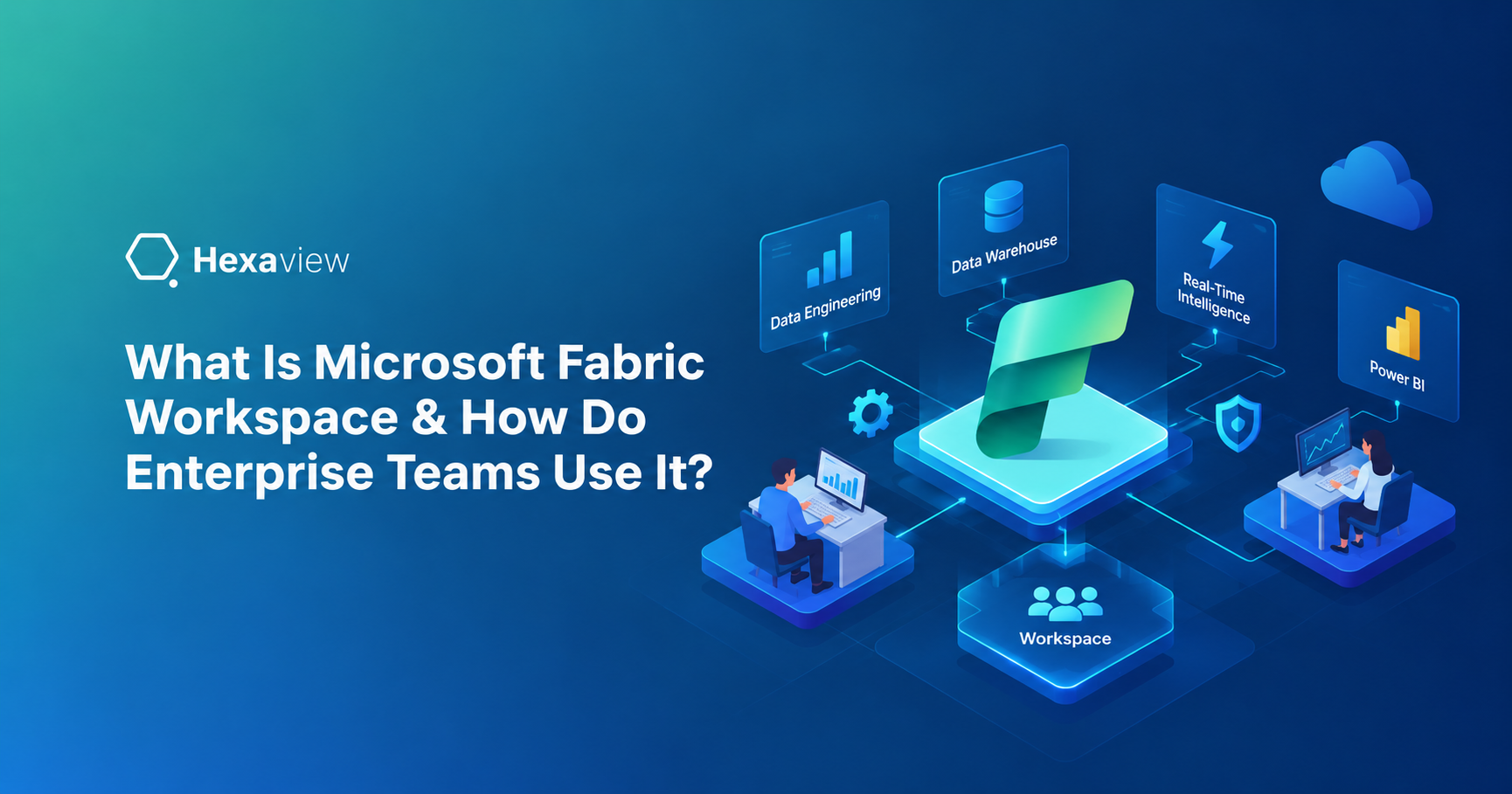
A Microsoft Fabric workspace is a collaborative environment where teams create, manage, organize, and secure Fabric items such as lakehouses, warehouses, pipelines, semantic models, and reports. Enterprise teams use workspaces to separate workloads, manage access, support development, and organize deployment. As Fabric environments grow, thoughtful workspace design becomes important for governance, security, collaboration, and scalable workspace architecture.
A Microsoft Fabric workspace is a shared environment where teams create, organize, manage, and collaborate on Fabric items. It provides a practical boundary for working with data, analytics, reporting, and engineering resources within a Fabric environment.
A workspace can contain lakehouses, warehouses, pipelines, notebooks, semantic models, reports, dashboards, and other Fabric items. Users can work with different Fabric workloads from the same workspace instead of managing each workload in a separate platform.
It is important to understand that a workspace is not a storage layer or a capacity. The workspace organizes and manages Fabric items, while OneLake provides the underlying unified data lake. Capacity provides the compute resources used to run Fabric workloads. Domains provide a higher-level way to organize related workspaces around business areas.
This distinction becomes important when designing enterprise environments. A well-planned workspace architecture can improve collaboration, access management, governance, and workload organization without confusing these separate Fabric components.
Creating a Microsoft Fabric workspace takes only a few steps. Designing the right workspace structure is more complex, especially as enterprise environments expand. Workspaces should reflect clear ownership, workloads, environments, and access requirements rather than being created without a consistent strategy.
Poor workspace design can create unclear ownership and excessive permissions. It can also mix development and production work, making deployments harder to manage. Inconsistent naming can make resources difficult to find, while weak workload isolation can complicate governance. Teams may also experience capacity contention when multiple workloads compete for shared capacity resources.
A thoughtful workspace architecture helps teams establish clearer boundaries for collaboration, security, deployment, and resource management. It also gives administrators a more practical foundation for applying Fabric workspace best practices as the organization grows.
Key Takeaway: The question is not “How many workspaces should we create?” It is “What should each workspace represent?”
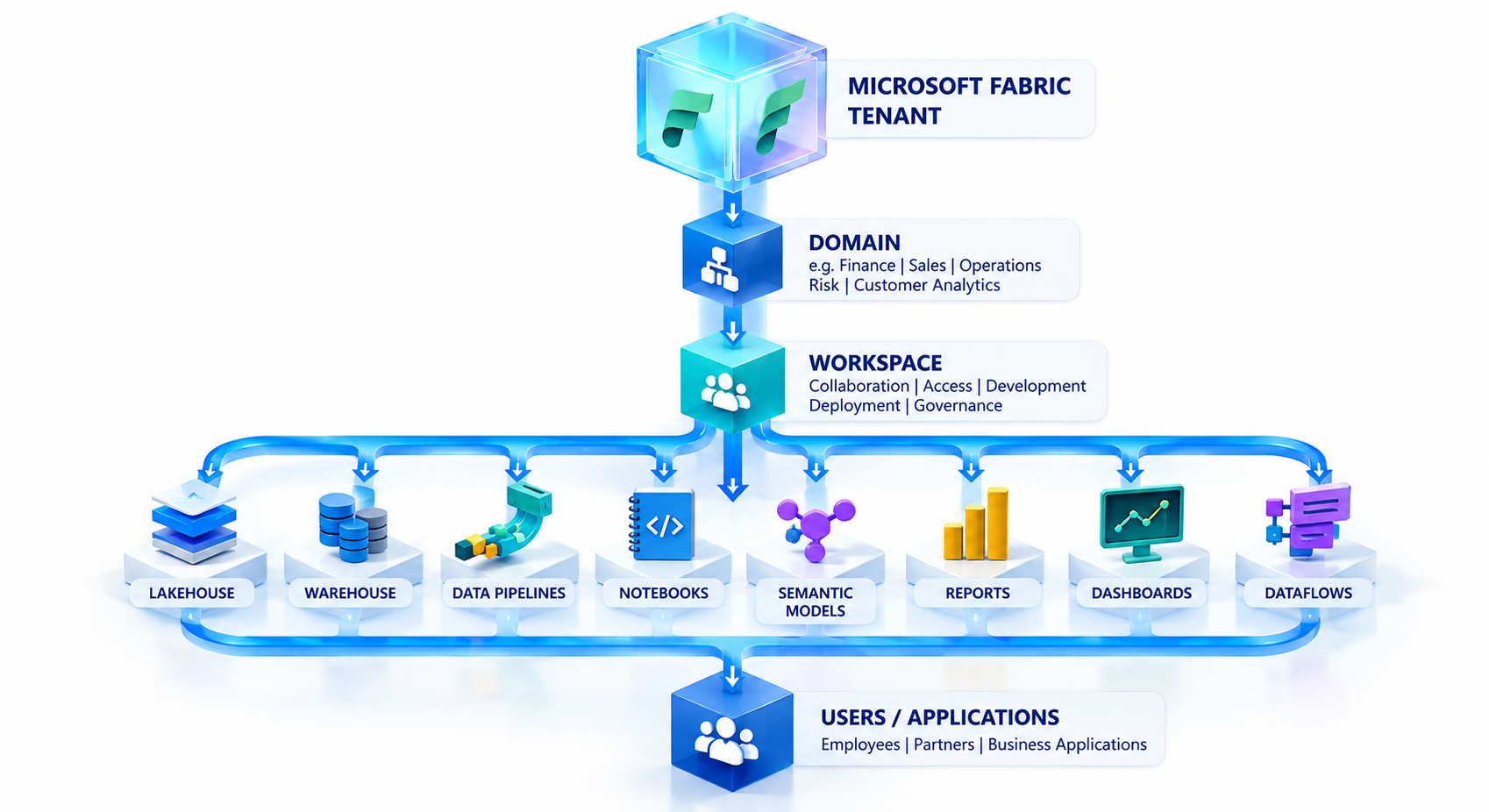
A Microsoft Fabric workspace architecture works as a layered structure. Each layer has a different purpose, helping enterprise teams organize resources, delegate responsibilities, and manage workloads at scale.
The tenant is the organization's overall Microsoft Fabric environment. It provides the broader organizational boundary within which domains, workspaces, users, and Fabric resources are managed.
Domains group related workspaces around business areas or functions. For example, an enterprise might organize workspaces into Finance, Sales, Operations, Risk, or Customer Analytics domains. Domains can also support delegated administration across business areas.
Workspaces provide the practical boundary for collaboration, access, item organization, development, deployment, and governance. Teams use them to manage related Fabric resources and control who can work with them.
A workspace can contain lakehouses, warehouses, data pipelines, notebooks, semantic models, reports, dashboards, and dataflows. These items support different stages of the organization's data and analytics processes.
Capacity provides the compute resources that run Fabric workloads. It is separate from the workspace itself. Understanding this distinction is important when planning performance, workload distribution, and enterprise scale.
Enterprise teams use Microsoft Fabric workspaces to organize data, analytics, engineering, and reporting activities within defined operational boundaries. Instead of treating a workspace as a simple folder, organizations can use it as part of their broader operating model for analytics.
Data engineers can use workspaces to manage data ingestion, pipelines, notebooks, lakehouses, and transformation workflows. A workspace can bring these resources together so engineers can build and maintain related data processes in one environment.
BI teams can work with semantic models, Power BI reports, dashboards, and shared analytical datasets. This allows analysts to build reports from governed data while collaborating with other teams working on the same analytical environment.
Data scientists can use workspaces for notebooks, data exploration, feature engineering, and machine learning workflows. Keeping related resources together can make experimentation and collaboration easier.
Finance, sales, operations, and other business teams can consume governed reports and analytical outputs without managing the underlying engineering layer. This creates separation between data production and business consumption.
Platform teams can manage workspace ownership, permissions, capacity allocation, governance policies, lifecycle management, and monitoring. These controls become increasingly important as the number of workspaces and users grows.
The result is a workspace model that supports more than report storage. It becomes a practical boundary for collaboration, security, development, deployment, and governance across the enterprise.
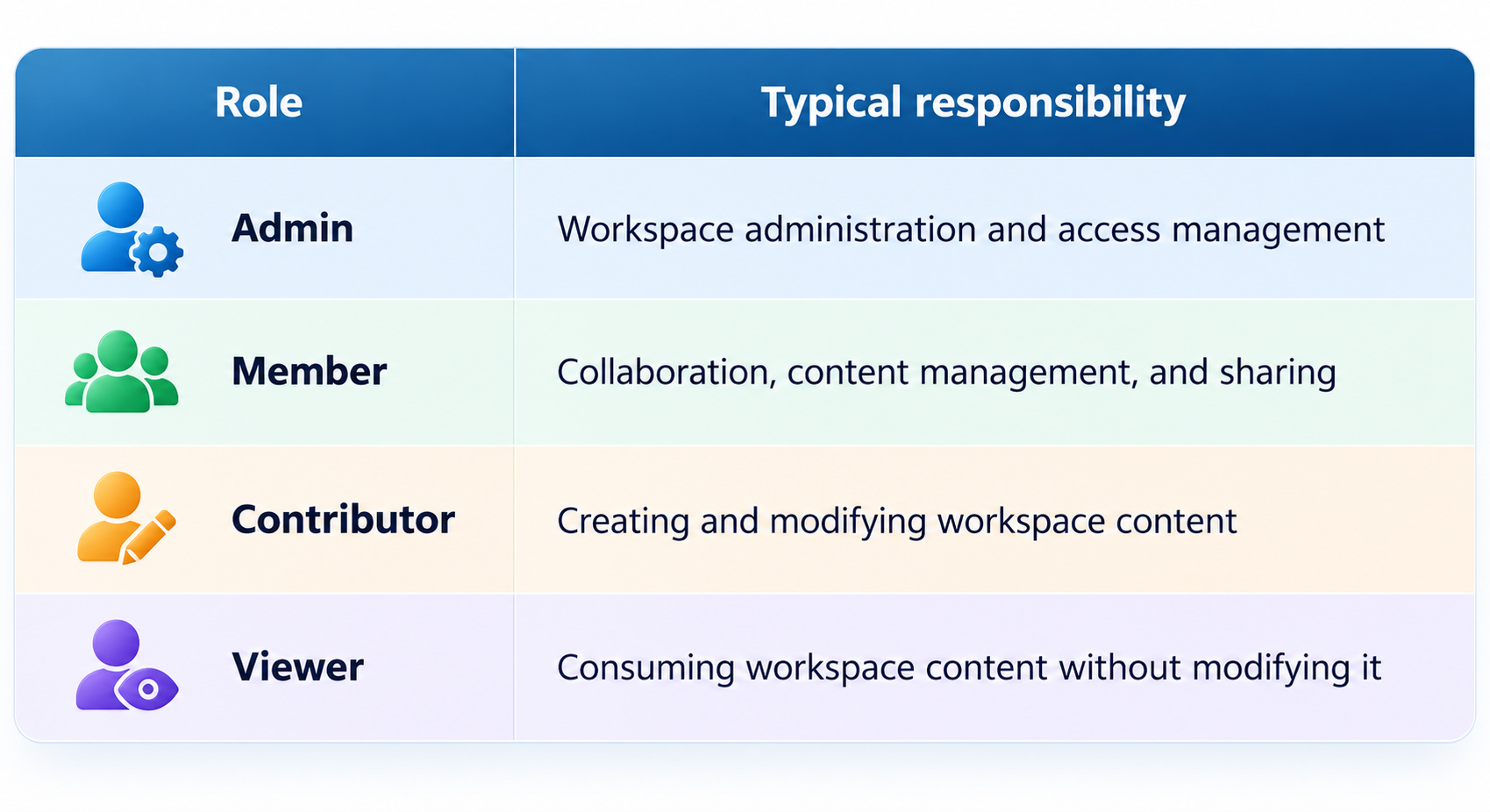
Microsoft Fabric provides four main workspace roles for controlling access to workspace content. These roles apply at the workspace level and can be assigned to individual users or groups.
Enterprise workspace architecture should follow a least-privilege approach. Users should receive only the access needed for their responsibilities. Security groups can simplify role assignment and make access easier to manage as teams change.
Development and production workspaces should also have clearly separated access. This reduces the risk of unintended changes reaching production. For sensitive financial or customer data, workspace boundaries should reflect data sensitivity and ownership. Clear ownership also makes permission reviews and lifecycle management easier.
The goal is not simply to restrict access. It is to design workspace boundaries that make roles, responsibilities, and data access clear across the enterprise.
Strong Fabric workspace best practices help enterprise teams scale without creating unnecessary complexity. The following principles can guide workspace architecture from the beginning.
A workspace can represent a business domain, product, data platform, project, or environment. Choose a boundary that matches how teams actually work. Avoid creating a separate workspace for every small report or dataset.
Use a Dev → Test → Production model when workloads require controlled lifecycle management. This separation allows teams to develop and validate changes before promoting them to production through deployment processes.
Names should quickly communicate the business area, purpose, and environment.
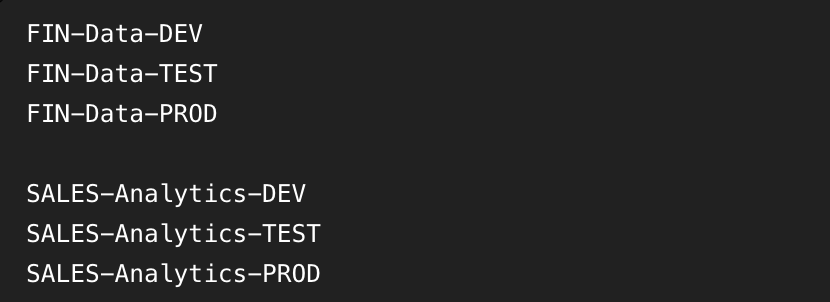
Consistent naming makes workspaces easier to identify, administer, and govern.
Every production workspace should have defined business, technical, and platform ownership. Clear accountability simplifies access reviews, support, and lifecycle decisions.
Assign users the lowest workspace role that meets their needs. Avoid giving Admin or Member access when Viewer or Contributor is sufficient.
Fabric workloads can share capacity resources. Separating resource-intensive workloads when appropriate can help reduce competition and improve operational predictability.
Use Git integration, deployment pipelines, and controlled promotion where appropriate. These practices provide better version control and make changes easier to review and manage.
Build governance into the workspace model from the start. Define standards for naming, ownership, permissions, data classification, retention, monitoring, and auditability rather than adding them after the environment becomes difficult to manage.
Together, these practices create a workspace architecture that can support enterprise growth without sacrificing control or usability.
Workspace design can become difficult when teams create workspaces without considering long-term operational requirements. These common mistakes can create unnecessary complexity as a Fabric environment grows.
A single workspace can make ownership, permissions, deployments, and governance difficult to manage across unrelated teams and workloads.
Creating a workspace for every report or small project can cause fragmentation. Teams may end up duplicating processes, permissions, and administrative effort.
Combining development and production work increases the risk of unintended changes reaching live workloads. Separate environments provide clearer lifecycle boundaries.
Broad Admin or Member access can expose sensitive data and allow unnecessary changes. Role-based, least-privilege access provides stronger control.
Workspace architecture should consider workload requirements because Fabric workloads can compete for shared capacity resources.
The architecture lesson is simple: start with business, data, security, and lifecycle requirements—not the workspace creation button.
A practical enterprise Microsoft Fabric workspace architecture can organize workspaces by business domain and lifecycle environment. For example:
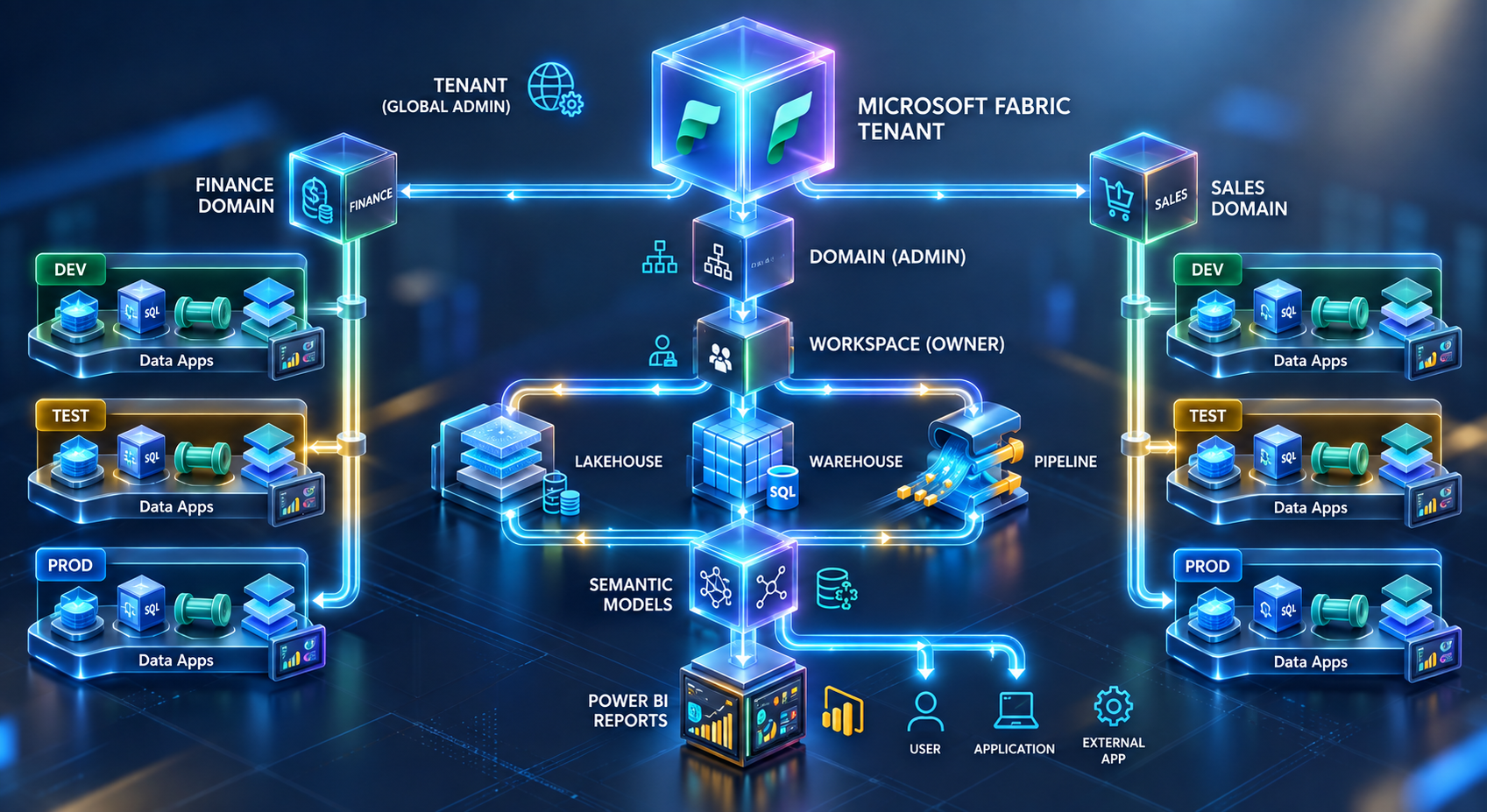
In this model, each domain can contain workspaces aligned with development, testing, and production requirements. Related Fabric items are then organized within the appropriate workspace.
However, there is no universal workspace architecture for every organization. The right design depends on factors such as organization size, data sensitivity, team structure, deployment requirements, workload types, governance models, and capacity strategy.
Some organizations may need separate workspaces for strong workload or security isolation. Others may benefit from fewer, broader workspaces to reduce administrative overhead.
The key is to design workspace boundaries around actual business, security, operational, and lifecycle requirements rather than copying another organization's structure.
Choosing a Microsoft Fabric workspace strategy starts with understanding the requirements behind each workload. Before creating a workspace, enterprise teams should ask five questions:
If two workloads have different ownership, security, lifecycle, or performance requirements, they may need separate workspace boundaries. This approach helps teams design workspaces around actual operational needs rather than creating them arbitrarily.
Enterprise Microsoft Fabric workspace architecture should align with business requirements, data ownership, security, and operational goals. Hexaview helps organizations approach workspace design as part of a broader Fabric architecture and implementation strategy.
Hexaview assesses the existing data landscape, business requirements, workspace needs, capacity considerations, and governance requirements. This provides a foundation for defining an appropriate workspace strategy.
The implementation approach can cover workspace hierarchy, naming standards, Dev/Test/Prod separation, access models, capacity strategy, and deployment processes. The goal is to create an environment that teams can operate and scale effectively.
For organizations moving from legacy analytics environments, workspace architecture can be incorporated into the broader Fabric migration and modernization plan. This helps establish appropriate boundaries as workloads move into Fabric.
Hexaview can also support security, lifecycle management, monitoring, cost optimization, and performance as the Fabric environment evolves.
If your organization is planning Microsoft Fabric adoption or needs to redesign its existing Fabric environment, Hexaview can help define the architecture, workspace strategy, and implementation roadmap.
What is a Microsoft Fabric workspace?
A Microsoft Fabric workspace is a collaborative environment where teams create, organize, manage, and secure Fabric items. These can include lakehouses, warehouses, pipelines, notebooks, semantic models, reports, dashboards, and dataflows. Workspaces provide practical boundaries for collaboration, access control, development, deployment, and governance.
What is the difference between a Microsoft Fabric workspace and a capacity?
A workspace is an organizational and management boundary for Fabric items, users, permissions, and collaboration. Capacity provides the compute resources used to run Fabric workloads. They serve different purposes: the workspace organizes and manages resources, while capacity supplies the processing resources those workloads consume.
How many workspaces should an enterprise have in Microsoft Fabric?
There is no fixed number of workspaces an enterprise should create. The appropriate number depends on business ownership, security requirements, lifecycle environments, workload types, deployment processes, and governance needs. Workspaces should represent meaningful boundaries rather than being created for every individual report, dataset, or small analytical task.
What are the best practices for Microsoft Fabric workspace design?
Key Fabric workspace best practices include using clear naming conventions, applying least-privilege access, separating environments when appropriate, defining ownership, establishing governance standards, and considering capacity requirements. Organizations should design workspace boundaries around business, security, lifecycle, and workload requirements rather than relying on a one-size-fits-all structure.
Should Microsoft Fabric have separate Dev, Test, and Production workspaces?
Separate Dev, Test, and Production workspaces can make sense when teams need controlled development, testing, and deployment processes. This separation helps reduce production risks and supports lifecycle management. However, the exact environment structure should reflect workload complexity, team size, deployment requirements, and governance needs rather than being applied automatically to every workload.
What are the four Microsoft Fabric workspace roles?
Microsoft Fabric provides four primary workspace roles: Admin, Member, Contributor, and Viewer. Admins manage the workspace and access, Members support collaboration and content management, Contributors create and modify content, and Viewers primarily consume content. These roles allow organizations to assign workspace access according to users' responsibilities.








.svg)



.svg)