
Microsoft Fabric pricing is primarily capacity-based. Fabric uses F SKUs, with F2 providing 2 Capacity Units (CUs), F4 providing 4 CUs, and F8 providing 8 CUs. Your total Fabric cost depends on the capacity SKU, runtime, pay-as-you-go or reservation model, workload consumption, OneLake storage, Power BI licensing needs, Azure region, and usage patterns. Capacity management and scaling can also affect your final Fabric pricing.

Microsoft Fabric pricing is built around a shared capacity model. Instead of assigning separate compute resources to every workload, organizations provision Fabric capacity that workloads can use. F SKUs define the baseline compute available, measured in Capacity Units (CUs). For example, F2 provides 2 CUs, F4 provides 4 CUs, and F8 provides 8 CUs.
Multiple Fabric workloads can consume the same capacity. These include Data Factory, Data Engineering, Data Warehouse, Power BI, Real-Time Intelligence, and Data Science. This shared model lets organizations allocate compute across different analytics needs.
Microsoft recommends matching capacity size to actual workload requirements. Capacity planning involves measuring utilization and selecting an appropriate SKU.
Fabric pricing is not simply a per-user subscription. Capacity is a core part of Microsoft Fabric licensing and cost planning. User-level licenses can still matter, particularly for Power BI access and specific usage scenarios, but they are only one part of the overall pricing model.
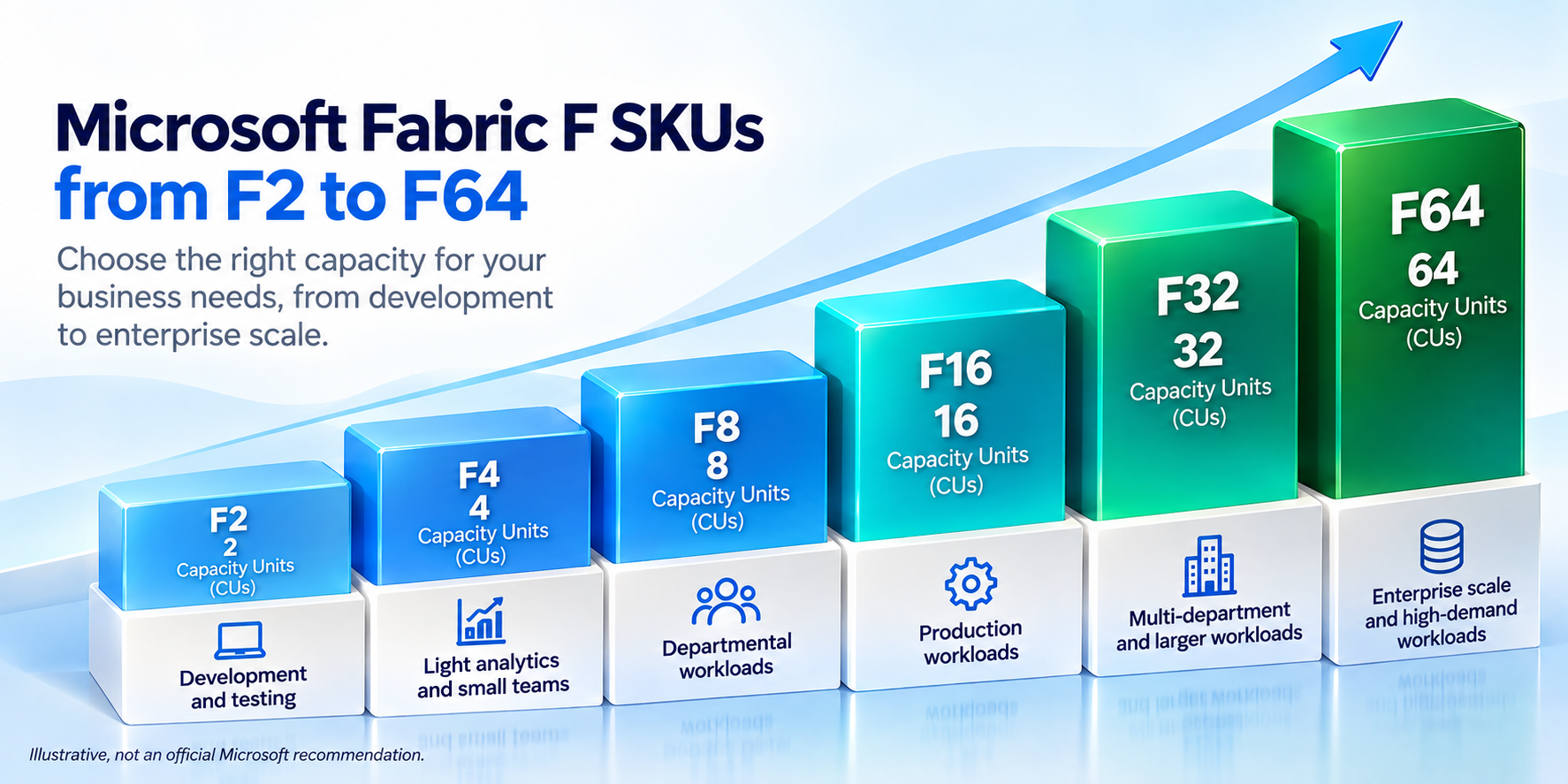
Microsoft Fabric uses F SKUs to define baseline compute capacity. The SKU determines the number of Capacity Units (CUs) available to workloads. Microsoft currently lists F2, F4, F8, F16, F32, F64, and larger capacities.
F2 provides 2 Capacity Units (CUs). It can suit smaller workloads, development environments, testing, or ad hoc use. Microsoft also supports bursting, allowing some workloads to temporarily use more compute than the provisioned baseline.
However, choosing F2 simply because it has the lowest capacity level can be misleading. Actual utilization, concurrency, workload type, and performance requirements should determine sizing.
F4 provides 4 CUs, giving twice the baseline capacity of F2. This provides more room for concurrent workloads and higher compute demand.
F4 can make sense when an F2 capacity experiences sustained utilization or performance constraints. Microsoft recommends monitoring capacity utilization before resizing.
F8 provides 8 CUs, or four times the baseline capacity of F2. It offers additional room for concurrent analytics and data workloads.
That does not mean F8 is automatically better. Larger capacity should match measured workload requirements rather than assumptions about workload size.
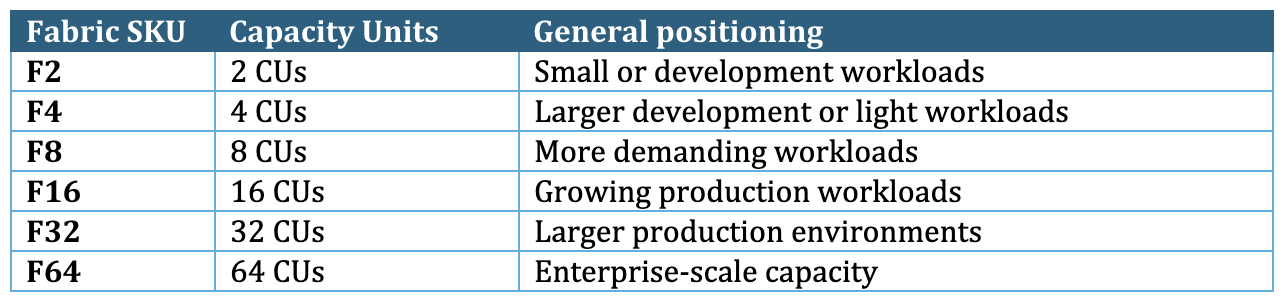
These descriptions are general capacity levels, not fixed Microsoft workload recommendations. Microsoft recommends measuring utilization and then selecting or resizing the SKU based on actual requirements.
Understanding Fabric cost requires looking beyond the SKU name. Several factors determine how much capacity an organization needs and how much it ultimately pays.
Capacity Units (CUs) represent the baseline compute available within a Fabric capacity. Higher F SKUs provide more baseline compute, giving workloads more resources to process data and analytics operations.
Runtime also affects Microsoft Fabric pricing. Under pay-as-you-go pricing, a capacity running continuously can cost more than one that operates only during required periods. Organizations can therefore manage costs by pausing capacity when it is not needed, where supported.
Fabric workloads share the available capacity. Data engineering jobs, pipelines, warehouse queries, Power BI operations, and other workloads can consume compute resources. Heavier or sustained activity can increase capacity requirements.
Multiple workloads running simultaneously can create additional demand. A capacity that handles one workload comfortably may require more resources when several operations run together.
Fabric can temporarily provide processing beyond a capacity's baseline in certain circumstances. Microsoft documents burst behavior and factors that vary by SKU.
The key distinction is simple: choosing an F SKU is a capacity-planning decision, not simply a licensing decision.
Microsoft Fabric offers different purchasing approaches for organizations with different usage patterns. Microsoft lists Fabric capacity pricing on hourly and monthly terms, depending on the purchasing model.
Pay-as-you-go (PAYG) provides a flexible consumption model. It can suit organizations still assessing their Fabric workload requirements. Under this model, organizations pay for the capacity they run, making runtime an important part of Fabric cost. Capacity can also be paused when appropriate, helping avoid paying for unused runtime.
Reserved capacity is intended for predictable, sustained workloads. It involves a longer-term commitment in exchange for potentially lower effective compute pricing than equivalent PAYG usage. However, reservation is not automatically cheaper in every situation. The economics depend on capacity utilization, runtime, pricing terms, and the commitment period.
For organizations with variable or uncertain workloads, flexibility can have significant value. For consistently utilized capacity, longer-term pricing can change the overall Microsoft Fabric pricing calculation.
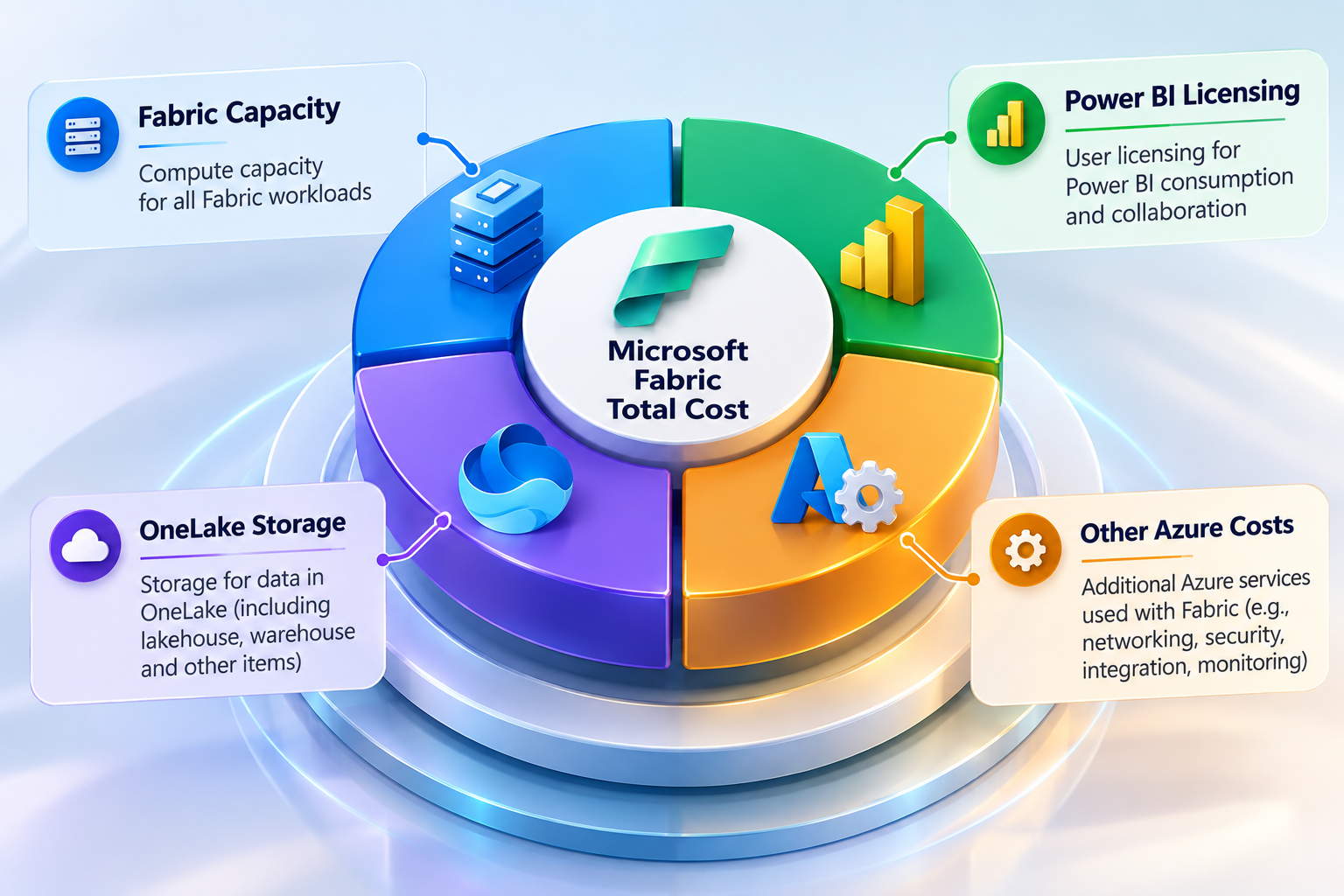
Microsoft Fabric licensing includes more than the capacity SKU itself. Organizations should evaluate capacity, user licenses, storage, and related Azure services when calculating their total Fabric cost.
The core requirement is a Fabric capacity. Organizations can purchase an F SKU through an Azure subscription or a Cloud Solution Provider (CSP). The selected SKU provides the compute resources used by Fabric workloads.
Power BI licensing depends on the capacity and how users consume content. Fabric includes per-user license options such as Fabric Free, Power BI Pro, and Premium Per User (PPU). The required license can vary based on the workspace, user role, and content-sharing scenario.
An F64 or larger capacity can allow users with a free Fabric license to view Power BI content when they have the appropriate viewer role. Smaller F capacities have different requirements. Therefore, it is inaccurate to assume that an F64 capacity simply makes Power BI free for everyone.
OneLake storage is another cost consideration. Storage is billed separately based on the data stored, while OneLake transactions consume Fabric capacity.
Organizations should also evaluate related Azure services and networking requirements where applicable. Not every cloud cost associated with a broader data architecture is automatically included in the Fabric capacity price. This makes the overall Microsoft Fabric cost dependent on the complete architecture, not just the selected F SKU.
Several factors influence Microsoft Fabric cost. The capacity SKU matters, but actual workload behavior can have an equally important impact.
Microsoft recommends monitoring actual utilization when planning and managing capacity. This provides a stronger basis for sizing than relying only on workload estimates. Always look for expert Microsoft Fabric Implementation services to ensure making correct utilization upon implementation.
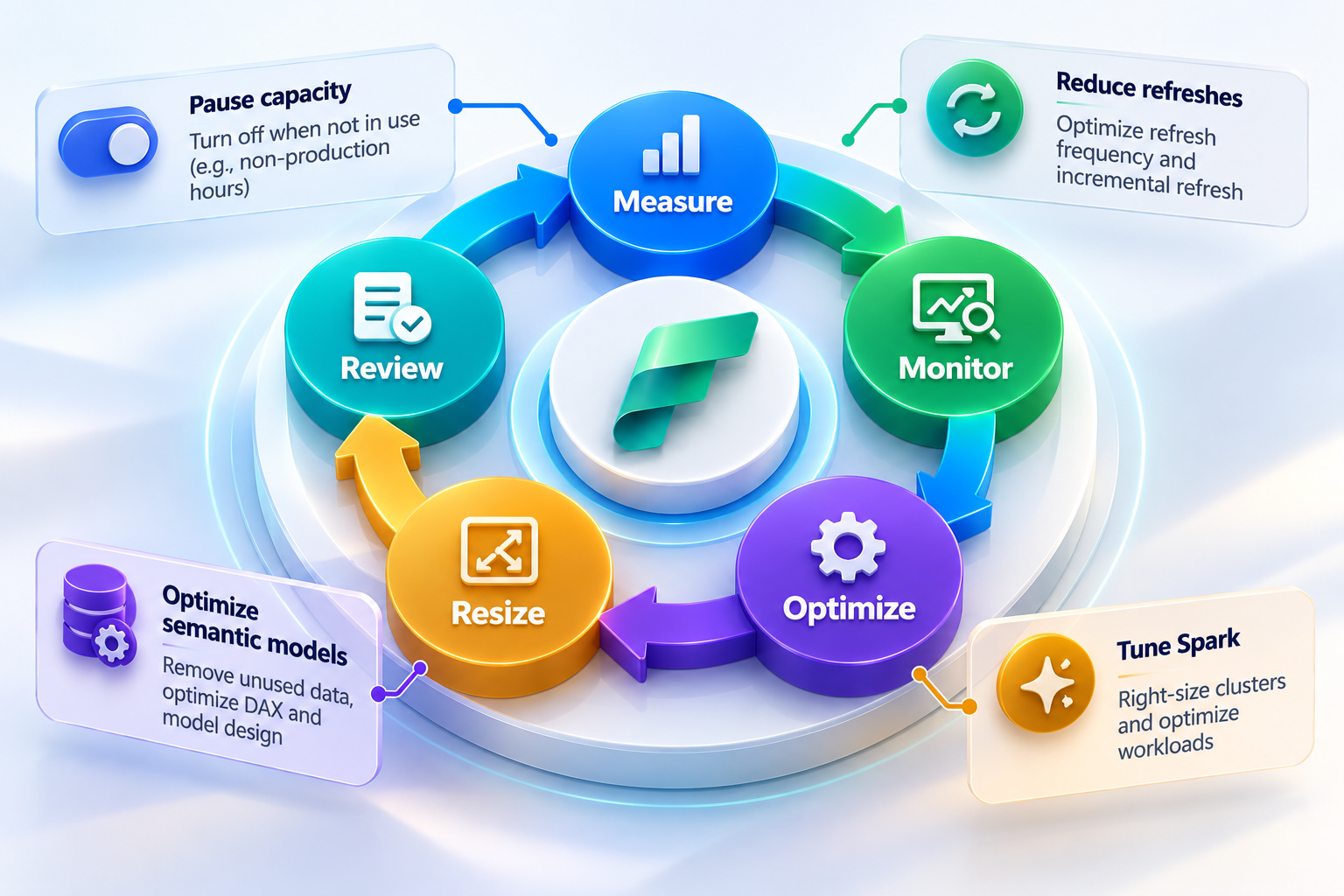
Effective Fabric cost optimization starts with measurement rather than simply choosing a smaller SKU. Organizations should first understand how their workloads use capacity.
Microsoft also provides a SKU Estimator to help assess capacity requirements. These tools can support more informed sizing and ongoing Microsoft Fabric cost management.
For enterprises managing complex workloads, Hexaview’s Microsoft Fabric consulting services can help assess capacity usage, workload architecture, optimization opportunities, and scaling strategies.
Hexaview Technologies works as a Microsoft Fabric consulting and data engineering partner, helping organizations evaluate architecture and capacity requirements before committing to a specific configuration.
An implementation partner can help teams:
Hexaview also provides a Microsoft Fabric Cost Saving Calculator that can help organizations model their potential Fabric economics. The calculator allows teams to compare an existing data and analytics stack with a proposed Fabric configuration, including assumptions for capacity, storage, and Power BI licensing.
The goal is not simply to choose the smallest F SKU. It is to understand workload requirements and build a sustainable cost model.
Before selecting an F SKU, estimate your existing platform costs and model the expected Fabric configuration.
Choosing a Fabric SKU should start with measured workload requirements, not assumptions about business size. Microsoft Fabric implementation services can help organizations plan architecture, capacity, governance, and workload optimization.
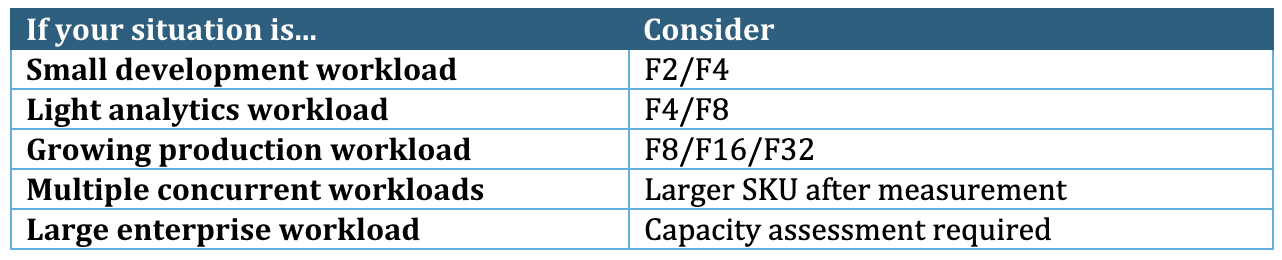
This table is illustrative, not Microsoft's official SKU recommendation chart.
The right Fabric capacity is generally the smallest SKU that reliably handles your measured workload without persistent throttling or unacceptable performance. Workload concurrency, peak demand, refresh schedules, and utilization can all affect the appropriate size.
Microsoft provides capacity-planning guidance and recommends reviewing utilization before resizing. Monitoring actual consumption helps organizations determine whether capacity should be increased, reduced, or reconfigured.
Talk To Microsoft Fabric Consultants
1. How much does Microsoft Fabric cost?
There is no single universal Microsoft Fabric price. Your total cost depends on the selected capacity SKU, runtime, Azure region, purchasing model, OneLake storage, and applicable licensing requirements. Pay-as-you-go and reserved pricing can also produce different costs. Check Microsoft's current pricing page for region-specific rates and the latest commercial terms.
2. What is Microsoft Fabric F2 pricing?
F2 provides 2 Capacity Units (CUs) and is the smallest standard Fabric F SKU. Its actual price depends on factors such as Azure region and purchasing model. Because Microsoft pricing can change, organizations should check the current Microsoft Fabric pricing page before estimating or committing to F2 capacity.
3. What is the difference between F2, F4 and F8 in Microsoft Fabric?
The primary difference is baseline compute capacity. F2 provides 2 CUs, F4 provides 4 CUs, and F8 provides 8 CUs. Higher capacity can support greater workload demand and concurrency, but it does not automatically reduce total costs. The appropriate SKU depends on measured utilization, workload behavior, performance requirements, and runtime.
4. Is Microsoft Fabric priced per user?
Fabric capacity itself uses a capacity-based pricing model, rather than simply charging for every Fabric user. However, user licensing can still apply depending on how users access Fabric and create or consume Power BI content. Requirements can vary by capacity and usage scenario, so organizations should evaluate both capacity and user licensing when calculating total cost.
5. Is Microsoft Fabric cheaper than Azure Synapse?
There is no universal answer because the comparison depends on the architecture and workload. Organizations should consider compute usage, storage, licensing, utilization, data integration requirements, Power BI usage, and operational overhead. A Fabric migration may change how these costs are structured, so comparing individual service prices alone may not represent the total cost.
6. How can I reduce Microsoft Fabric costs?
Start by sizing capacity from measured workloads and monitoring utilization continuously. Optimize queries, Spark workloads, semantic models, pipelines, and refresh schedules. Manage capacity runtime carefully and review peak concurrency. For predictable workloads, evaluate reservation economics against PAYG pricing. Hexaview's Microsoft Fabric Cost Saving Calculator can also help model capacity, storage, and licensing assumptions.








.svg)



.svg)