Salesforce Lightning Migration Services: What Every Business Should Know Before Switching?
Cloud based digital lending solutions are making finance faster, smarter, scalable, secure, and customer-focused.
Michael Sterling
5 min read
Share
Businesses today are rethinking how they use their CRM, and many are turning to salesforce lightning migration services to make the shift from Classic to Lightning Experience. Salesforce has made its direction clear by continuously investing in Lightning with new features, AI-driven tools, and advanced automation capabilities while Classic receives no new updates.
But this migration is far more than a visual refresh. It touches your workflows, reports, third-party integrations, and how well your teams actually adopt the new system.
Understanding what the switch truly involves helps you plan smarter and avoid costly surprises down the road.
What Is Salesforce Lightning Migration?
Understanding Salesforce Classic to Lightning Migration
Salesforce Classic to Lightning migration is the process of moving your entire CRM environment from the older Classic interface to the modern Salesforce Lightning Experience. It involves restructuring how your teams interact with data, tools, and processes inside Salesforce.
This migration covers several critical areas of your Salesforce environment:
Moving from Salesforce Classic to Salesforce Lightning Experience gives your teams a faster, more intuitive interface built for today's business needs.
Upgrading dashboards, reports, workflows, and page layouts ensures your data stays accurate, accessible, and aligned with how your business actually operates.
Rebuilding outdated Visualforce pages and custom code is often necessary because many Classic customizations do not function the same way in Lightning.
Improving mobile experience and usability becomes possible since Lightning is fully optimized for mobile, allowing your teams to work from anywhere without limitations.
Enabling AI tools, analytics, and automation opens the door to capabilities like Einstein AI, Flow Builder, and advanced reporting that Classic simply cannot support.
Each of these areas requires careful planning, testing, and execution to ensure a smooth transition.
Why Businesses Are Switching to Salesforce Lightning?
The shift to Salesforce Lightning is not just about keeping up with technology. It is about giving your teams the tools they need to work faster, sell smarter, and deliver better customer experiences. Here is what makes the salesforce lightning experience worth the investment:
Faster navigation and productivity means your teams spend less time clicking through menus and more time closing deals and resolving customer issues.
A more intuitive interface for sales and service teams reduces the learning curve and helps new users get up to speed quickly without extensive training.
Better dashboards and real-time reporting give managers and executives a clearer, up-to-date view of pipeline performance and business health at any moment.
Improved mobile access ensures your field teams and remote employees can log activities, update records, and access data from any device, anywhere.
Enhanced workflow automation with Flow Builder replaces manual, repetitive tasks with smart automated processes that save time and reduce human error.
Native AI capabilities through Salesforce Einstein help teams prioritize leads, predict outcomes, and surface actionable insights directly within their workflow.
Easier integrations with third-party tools streamline how Salesforce connects with your marketing, finance, and support platforms.
Future-proofing your CRM environment ensures your business stays aligned with where Salesforce is headed, protecting your long-term technology investment.
How to Assess Lightning Readiness?
Before you migrate to Salesforce Lightning, a thorough readiness assessment is not optional. It is the step that separates a smooth migration from a disruptive one. Skipping this phase often leads to broken workflows, lost customizations, and frustrated users after go-live. Salesforce lightning readiness evaluation helps you understand exactly what needs to be rebuilt, replaced, or retired before the switch begins.
Here is what a proper readiness assessment should cover:
Reviewing existing Salesforce Classic usage helps you understand which features your teams rely on daily and which ones are rarely used, so nothing critical gets overlooked.
Identifying Visualforce pages, JavaScript buttons, and unsupported customizations reveals the technical gaps that need to be addressed before Lightning can function properly in your environment.
Auditing integrations and third-party apps ensures that every connected platform continues to work as expected after the migration is complete.
Analyzing current workflows and reports helps you map what needs to be rebuilt or optimized inside Lightning's newer automation and reporting tools.
Checking Lightning compatibility for AppExchange apps confirms whether the tools your teams depend on are fully supported in the Lightning environment.
Identifying user pain points in Classic gives you the opportunity to fix existing frustrations during migration rather than simply replicating old problems in a new interface.
Defining migration goals and KPIs establishes clear benchmarks so you can measure whether the migration actually delivered the outcomes your business expected.
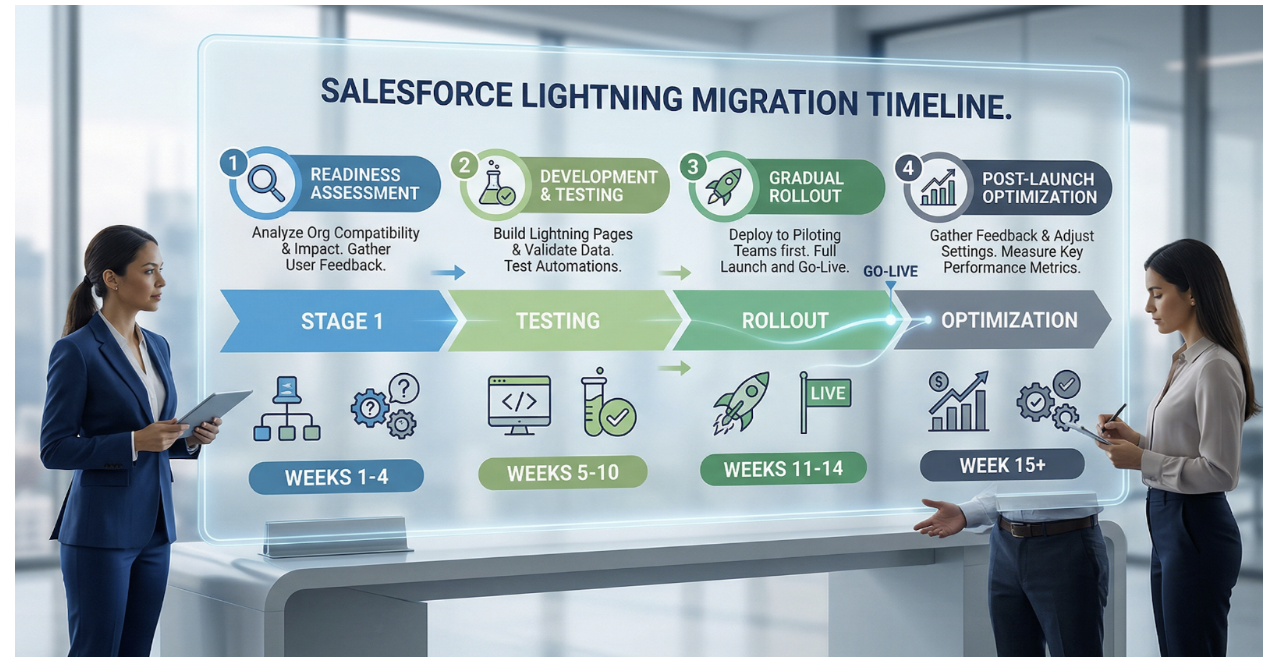
The Salesforce Lightning Migration Process
Migration Process at a Glance
Step-by-Step Salesforce Lightning Migration Process
A successful salesforce lightning migration follows a structured path. Rushing any phase increases risk. Here is how a well-planned migration unfolds from start to finish.
Step 1: Discovery and Readiness Assessment
Review your current Salesforce Classic environment to understand what is actively used and what can be retired before migration begins.
Use the Salesforce Lightning Experience Transition Assistant to get a built-in evaluation of your org's readiness and a prioritized list of action items.
Identify gaps and unsupported features so your team knows exactly what needs rebuilding before Lightning goes live.
Step 2: Data Cleanup and Customization Review
Remove duplicate and outdated records to ensure your Lightning environment starts with clean, reliable data that teams can actually trust.
Standardize fields and reports so your data structure is consistent and your reporting remains accurate after the transition.
Review page layouts and automations to confirm they align with Lightning's design requirements and your current business processes.
Step 3: Rebuild and Test
Replace JavaScript buttons with Lightning-compatible actions since JavaScript buttons are not supported in the Lightning Experience.
Recreate workflows with Flow Builder to take advantage of Lightning's more powerful and flexible automation capabilities.
Update Visualforce pages and custom apps to ensure they render and function correctly within the Lightning interface.
Test integrations and permissions thoroughly to catch any access issues or broken connections before they affect live users.
Step 4: User Training and Rollout
Train sales, support, and marketing teams on the new interface so they feel confident and productive from day one in Lightning.
Roll out Lightning in phases rather than switching everyone at once, which reduces disruption and allows issues to be resolved gradually.
Gather user feedback and improve usability so the final rollout reflects real-world needs, not just technical requirements.
Step 5: Post-Migration Optimization
Monitor performance and user adoption regularly to identify where teams are struggling and where additional support is needed.
Optimize dashboards and reports to take full advantage of Lightning's enhanced visualization and real-time data capabilities.
Continue updating automations and Lightning components as your business evolves and Salesforce releases new features and improvements.
Why Businesses Choose Hexaview for Salesforce Lightning Migration Services?
Hexaview Technologies is a trusted salesforce implementation partner with deep expertise in helping businesses plan and execute seamless migrations from Classic to Lightning. Whether you are a growing fintech firm, a healthcare organization, or a large enterprise, Hexaview brings a structured, low-disruption approach to every salesforce lightning migration project.
Here is what Hexaview delivers across the migration journey:
Tailored migration strategies based on business goals ensure your Lightning environment is built around how your teams actually work, not a generic template.
Readiness assessments and compatibility audits give you a clear picture of what needs to change before a single line of code is touched, reducing surprises during rollout.
Data cleanup and mapping support ensures your records, fields, and relationships are accurate, consistent, and ready for the Lightning environment from day one.
Lightning page customization and Flow automation through Hexaview's salesforce customization services help you build smarter pages and replace outdated workflows with powerful automated processes.
Integration support for ERP, finance, and customer service systems ensures that every platform connected to your Salesforce org continues to work without interruption after migration.
User training and post-launch support means your teams are confident, capable, and fully productive in Lightning from the moment it goes live.
Experience across fintech, healthcare, and enterprise sectors allows Hexaview to bring industry-specific knowledge to every migration challenge your business faces.
Hexaview creates custom migration plans, cleans and maps your data, rebuilds workflows inside Lightning, and delivers hands-on training so your teams experience minimal disruption throughout the entire process. Their salesforce consulting services cover every phase from initial audit to post-migration optimization, making them a reliable partner for businesses that cannot afford a failed rollout.
Conclusion
Salesforce Lightning migration is far more than a platform upgrade. It is a strategic move that reshapes how your teams work, how your data flows, and how your business grows. Success requires careful planning, thorough testing, meaningful user training, and a commitment to ongoing optimization after go-live.
Businesses that partner with an experienced salesforce implementation partner like Hexaview Technologies significantly reducing migration risk and improving team adoption across every department. Check out the Business Problems That Can Be Solved by Salesforce Agentforce.
Most importantly, migrating to Lightning future-proofs your CRM investment. It unlocks powerful AI capabilities, intelligent automation, and a user experience that keeps your teams engaged and productive. The businesses that make this move today will be better positioned to scale, adapt, and compete tomorrow.
FAQs
What are Salesforce Lightning migration services?
These are end-to-end services that help businesses move from Salesforce Classic to Lightning, covering assessment, rebuilding, testing, training, and post-launch support.
Why should businesses move from Salesforce Classic to Lightning?
Classic no longer receives new features. Lightning offers AI tools, better automation, improved mobile access, and a modern interface that drives productivity.
What are the biggest benefits of Salesforce Lightning?
Faster navigation, real-time dashboards, Flow Builder automation, Einstein AI, improved mobile experience, and seamless third-party integrations.
How long does Salesforce Lightning migration take?
Timelines vary based on org complexity. A simple migration may take a few weeks, while enterprise-level projects can take several months.
What happens to old workflows during Lightning migration?
Existing Classic workflows are reviewed, rebuilt using Flow Builder, and tested to ensure they function correctly in the Lightning environment.
Are JavaScript buttons supported in Salesforce Lightning?
No. JavaScript buttons are not supported in Lightning and must be replaced with Lightning actions or Quick Actions built using Flow or Apex.
Can Visualforce pages work in Salesforce Lightning?
Some Visualforce pages work in Lightning with limitations. Most require updates or full rebuilds to function correctly within the Lightning Experience.
What tools help with Salesforce Lightning migration?
Salesforce provides the Lightning Experience Transition Assistant, Lightning Readiness Check, and Optimizer to guide and support the migration process.
How do you test Lightning before going live?
Testing involves running the Lightning Experience in parallel with Classic, validating reports, dashboards, integrations, permissions, and gathering feedback from pilot users.
What are the common challenges during migration?
Unsupported customizations, broken integrations, user resistance, data quality issues, and underestimating the time needed for rebuilding workflows are the most frequent challenges.
How do you improve user adoption after Lightning migration?
Provide role-based training, create quick reference guides, collect regular feedback, and use Salesforce in-app guidance tools to support users after go-live.






.svg)




.svg)