
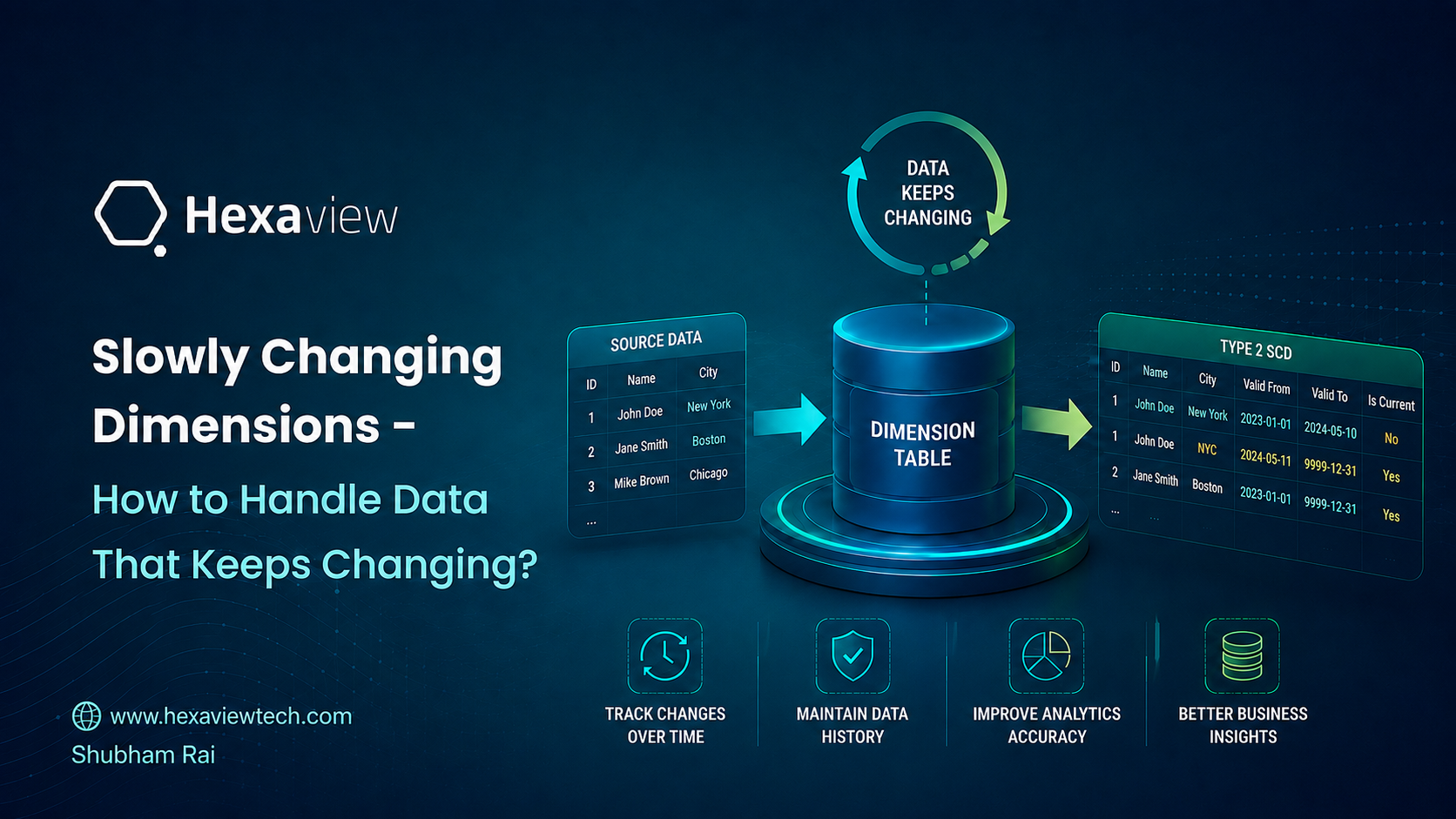
Slowly Changing Dimensions are a foundational concept in data warehousing, yet they remain one of the most frequently misunderstood aspects of dimensional modeling. The right SCD strategy can make or break the reliability of an organization's reporting, which is why getting it correct from the start matters so much. This article moves beyond the standard definitions to explain how each SCD type works in practice, and how to choose the one that fits your use case.
In every business, data keeps changing. Customers move to a new city. Products get new prices. Employees change roles. This is normal.
But it creates a real question: when the data changes, what should your data warehouse do with the old value?
If you just replace the old value with the new one, you lose the history. If you keep everything without a plan, your tables become a mess. Either way, your reports can end up wrong.
This is exactly the problem Slowly Changing Dimensions (SCD) solve. It's one of the most fundamental concepts in data engineering, and at Hexaview we deal with it on almost every data warehouse we build. This post explains how it works in plain language.
Say you work at a retail company. You have a customer named Priya.
She signed up when she lived in Delhi. A year later, she moved to Mumbai. Now your sales team asks two questions:
If you overwrite Delhi with Mumbai, you can't answer the second question anymore. SCD gives you a clean way to handle this so your reports stay correct.
A Slowly Changing Dimension is a data warehousing concept that describes how to handle changes in dimension data (like customer, product, or location information) over time.
When the value of an attribute in your data changes like a customer's city, you have to decide: Do I overwrite it? Do I keep the old value too? Or do I just track the last change? That decision is what SCD types help you make.
In Microsoft Fabric, you implement SCD logic using Notebooks powered by PySpark (Apache Spark with Python). This makes it easy to handle large datasets efficiently without writing complex SQL procedures.
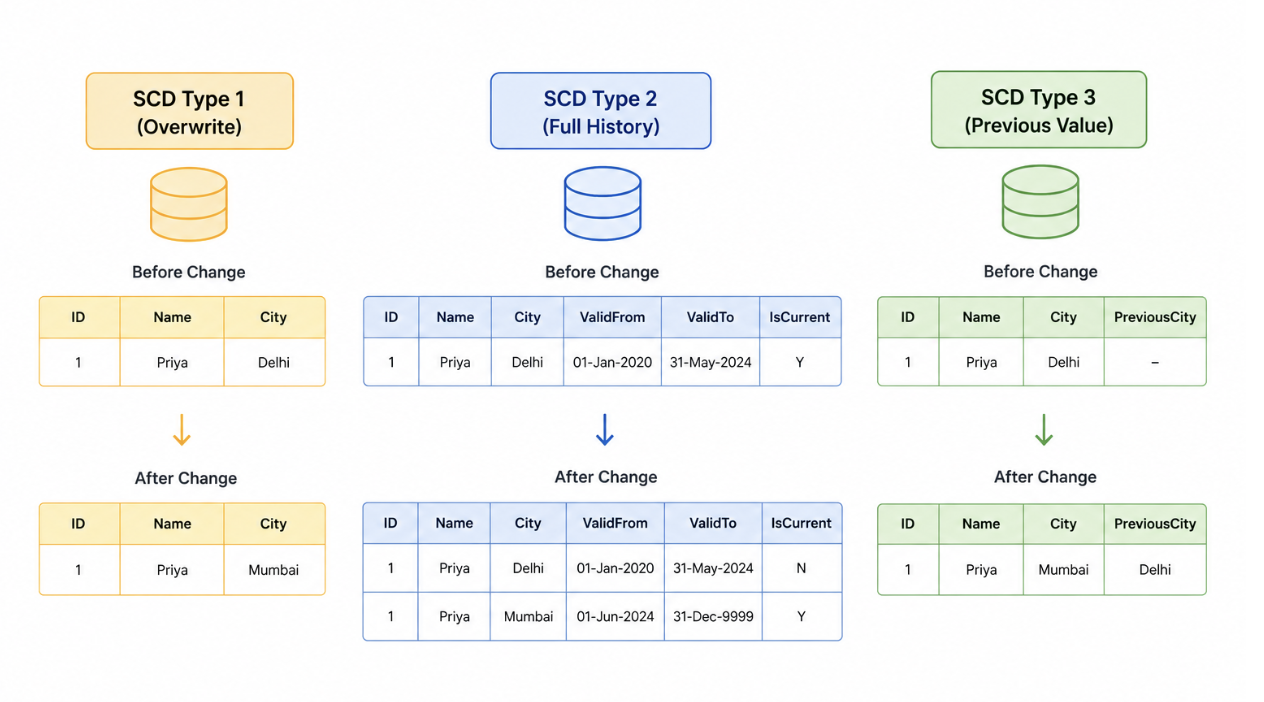
What it does: When data changes, you simply update (overwrite) the old value with the new one. No history is kept. The old value is gone forever.
Think of it like editing a Word document without Track Changes. You fix the typo, save, and move on. Nobody knows what the old value was.
When to use SCD Type 1:
• The old value is incorrect (e.g., a typo in a name)
• History does not matter for your reports
• You only care about the most current state of the data
Example: Customer Priya changes her phone number. You don't need her old phone number anywhere in your reports so you just overwrite it.
What it does: Every time data changes, a new row is added to the table with a new date range. The old row is kept with its end date. You always know exactly what the data looked like at any point in time.
This is the most powerful and most commonly used SCD type. It keeps a complete audit trail of all changes. Three special columns are used to manage this:
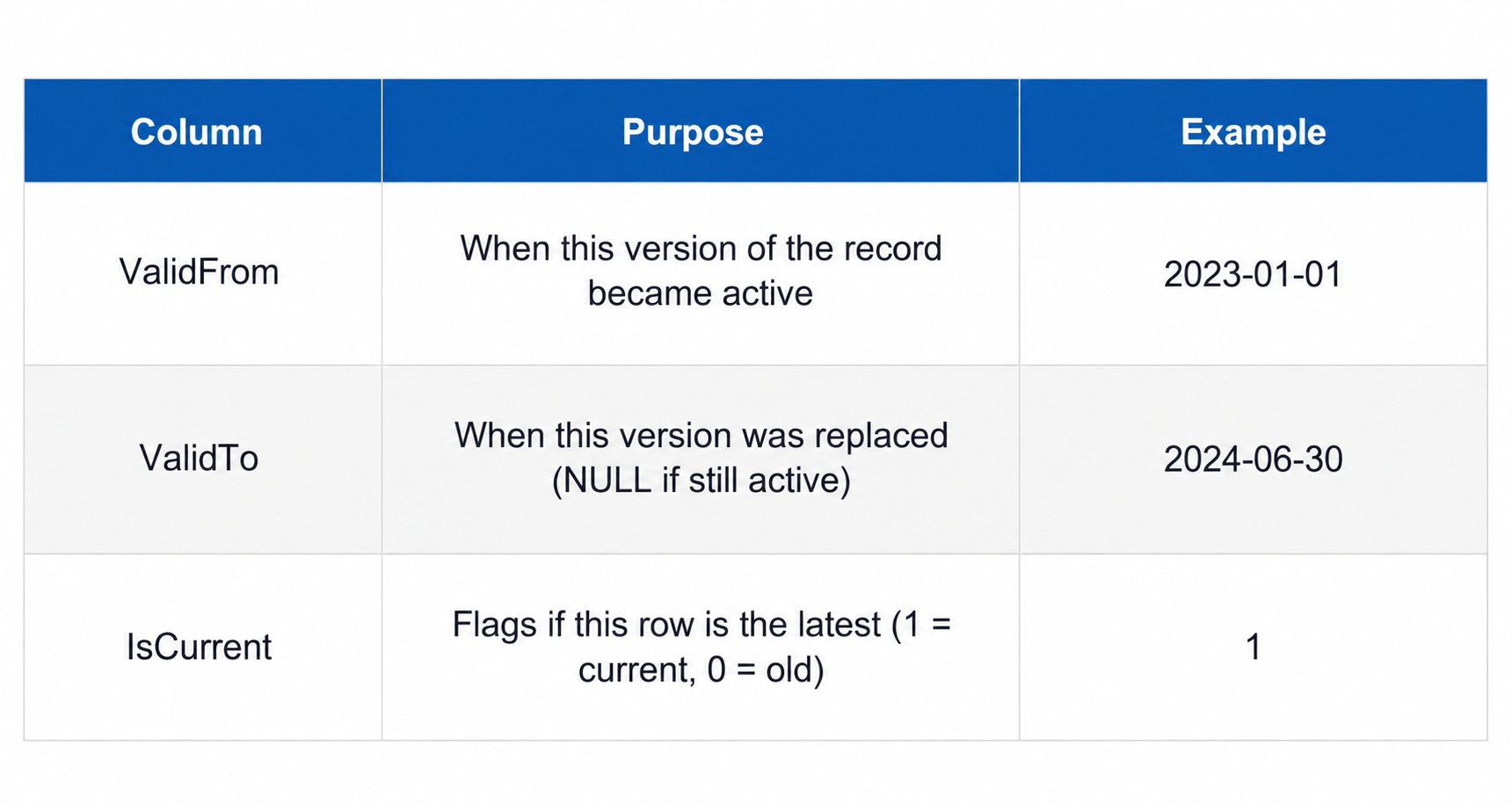
Example: Priya moved from Delhi to Mumbai on June 1, 2024. With SCD Type 2, you get two rows:

Now you can easily answer: What city was Priya in when she bought something in March 2023? The answer is Delhi because the ValidFrom and ValidTo columns tell you exactly that.
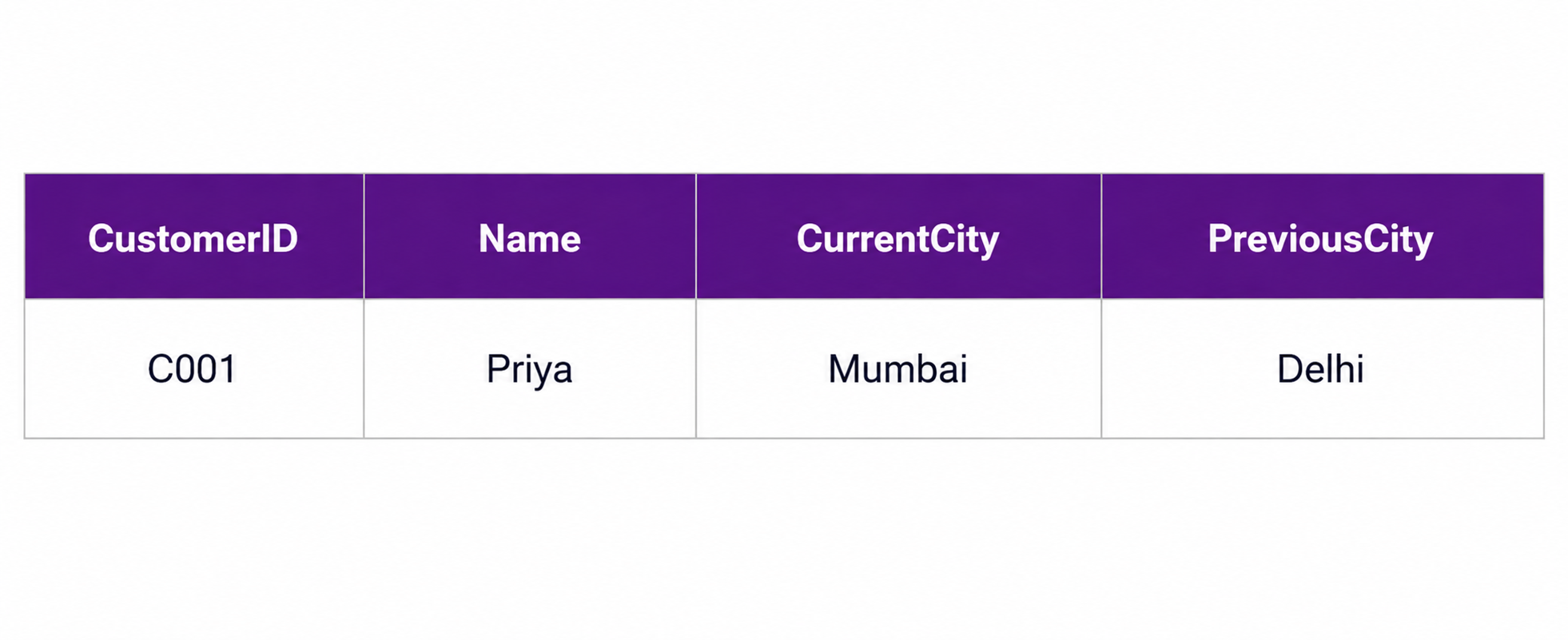
What it does: Instead of adding new rows, you add a new column called PreviousCity (or PreviousValue). You keep only the last known value and the current value nothing older.
SCD Type 3 is a middle ground,you want a little history, but not the full audit trail. It's simpler than Type 2 but less powerful.
Example: Priya's row would look like this after she moves from Delhi to Mumbai:
When to use SCD Type 3:
• You only need to compare current vs. previous state
• Full audit trail is not required
• You want to keep things simple without adding many rows
Here's what each SCD type produces:

There will be only those which are the most current view of each customers.
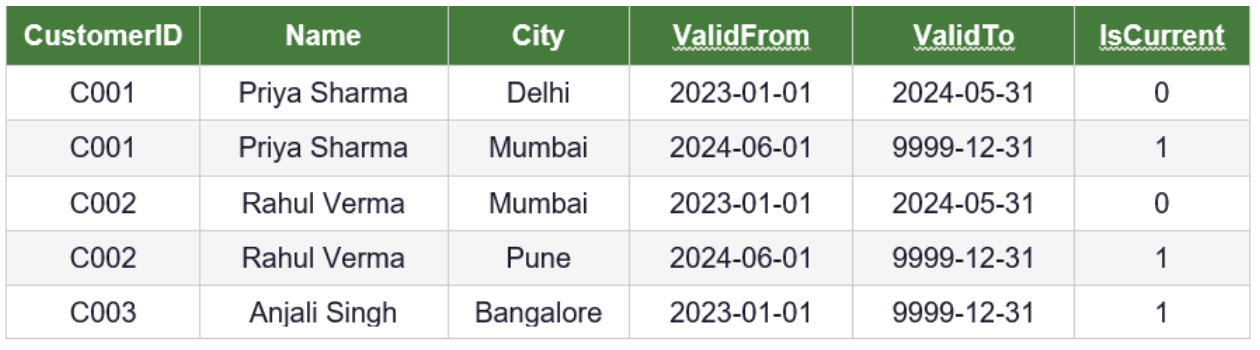
Now you have 5 rows instead of 3. Two versions of Priya and Rahul are stored. IsCurrent = 0 means that row is history. IsCurrent = 1 means it's the active record. Anjali's record is unchanged that's why she still has just one row.
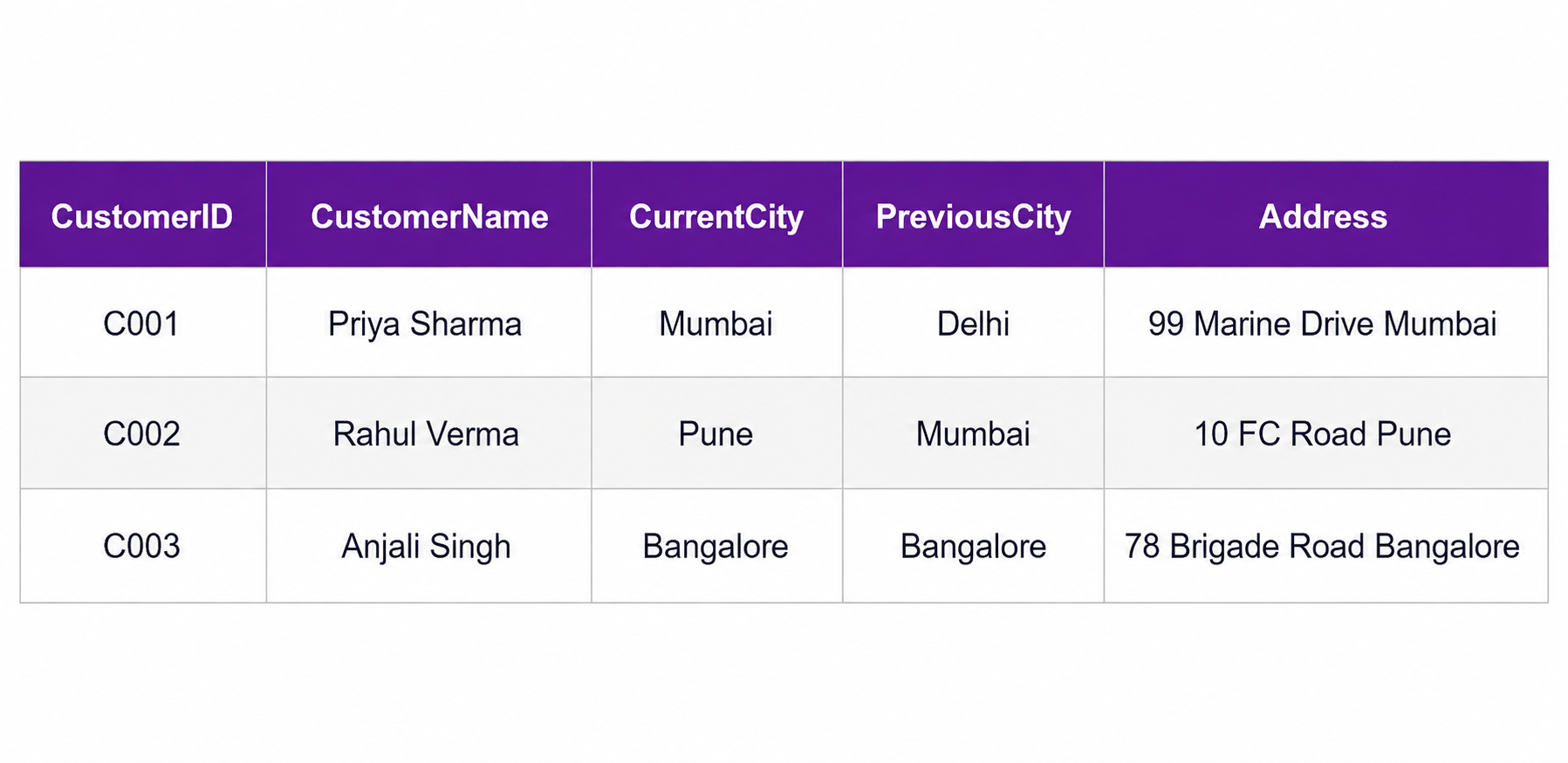
Still 3 rows but now each row has both the current city and the previous city as separate columns. You can only compare current vs. previous, nothing older than that.
Here's a simple guide to help you choose the right SCD type for your use case:
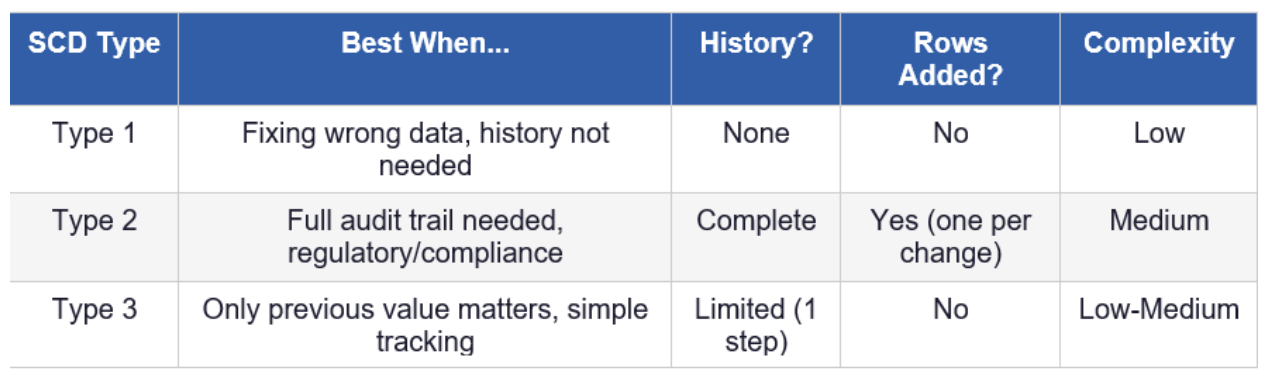
In real-world projects, SCD Type 2 is by far the most commonly used. If your project is in finance, healthcare, retail analytics, or any domain where you need to report on historical data Type 2 is almost always the answer.
Data changes. That's just a fact of life in any business. A customer moves cities. A product gets repriced. An employee changes roles. The real question is — how does your data warehouse handle it?
Slowly Changing Dimensions give you a structured, clean way to manage these changes without breaking your reports or losing important history. In Microsoft Fabric, implementing SCDs using PySpark Notebooks is both powerful and beginner-friendly.
Here's a quick recap of what you learned today:
• SCD Type 1: Simple overwrite. Use it when history doesn't matter.
• SCD Type 2: Full history with ValidFrom, ValidTo, and IsCurrent columns. The gold standard.
• SCD Type 3: Keeps only the previous value in a separate column. Quick and simple.
Building a new data warehouse, moving an old one, or struggling with reports that don't match your history? That's the kind of work our team does every day.
At Hexaview Technologies, our certified data experts help businesses build clean, reliable data platforms, with SCD set up the right way from the start.
1. What does "Slowly Changing Dimension" actually mean?
It's a data warehousing term for how you handle changes to descriptive data (like a customer's city, a product's price, or an employee's role) as it changes over time. "Slowly" just means these values don't change often, but when they do, you need a plan for what to do with the old value.
2. Which SCD type should I use?
It depends on how much history you need. Use Type 1 if you only care about the latest value and history doesn't matter. Use Type 2 if you need to know what the data was at any point in time (this is the most common choice). Use Type 3 if you only need to compare the current value with the previous one.
3. Why is SCD Type 2 the most popular?
Because it keeps a full history of every change without breaking your existing rows. It uses ValidFrom, ValidTo, and IsCurrent columns so you can always answer "what did this look like back then?" That makes it the go-to choice for finance, healthcare, retail analytics, and anywhere audit or historical reporting matters.
4. Doesn't SCD Type 2 create too many rows?
It does add a new row each time a value changes, so tables grow over time. But only records that actually change get new rows. A customer whose details never change keeps a single row. In practice, the extra rows are a small price to pay for accurate history, and modern data platforms handle the volume easily.
5. Can I use more than one SCD type in the same warehouse?
Yes, and most real projects do. You choose the type per column or per dimension based on what that data needs. For example, you might overwrite a corrected phone number (Type 1) while tracking a customer's full address history (Type 2) in the same table.








.svg)



.svg)