
Microsoft Fabric Power BI Integration connects Power BI with Fabric’s unified data platform, using OneLake, semantic models, and Power BI for governed analytics. Direct Lake enables faster access to lake-based data without traditional imports. Fabric modernizes existing Power BI environments by simplifying data architecture. Successful implementation requires careful planning for architecture, governance, security, migration, and performance.
Many enterprises already rely on Power BI, but their data landscape remains fragmented. Data sits across warehouses, databases, SaaS platforms, and files, while separate pipelines create duplicate datasets. As a result, teams may maintain conflicting metrics across reports and spend substantial time managing data movement.
Microsoft Fabric addresses this challenge by placing Power BI within a unified analytics platform. Microsoft describes Power BI as a distinct Fabric workload that integrates with other Fabric experiences. This makes Microsoft Fabric Power BI Integration a foundation for Power BI Modernization with Microsoft Fabric.
Power BI serves as Fabric's reporting and business intelligence workload. It provides interactive visualizations, semantic models, DAX-based calculations, business metrics, and self-service analytics. Organizations can also apply governance controls while allowing business users to explore trusted data.
Fabric provides a broader data platform supporting Power BI. OneLake provides unified storage, while Data Factory handles data integration and pipelines. Lakehouse and Warehouse support different analytical workloads. Real-Time Intelligence supports streaming and real-time analysis, while Data Science supports machine learning workflows. Governance capabilities help organizations manage access, security, and data quality across the environment.
A typical Microsoft Fabric Power BI Integration architecture follows:
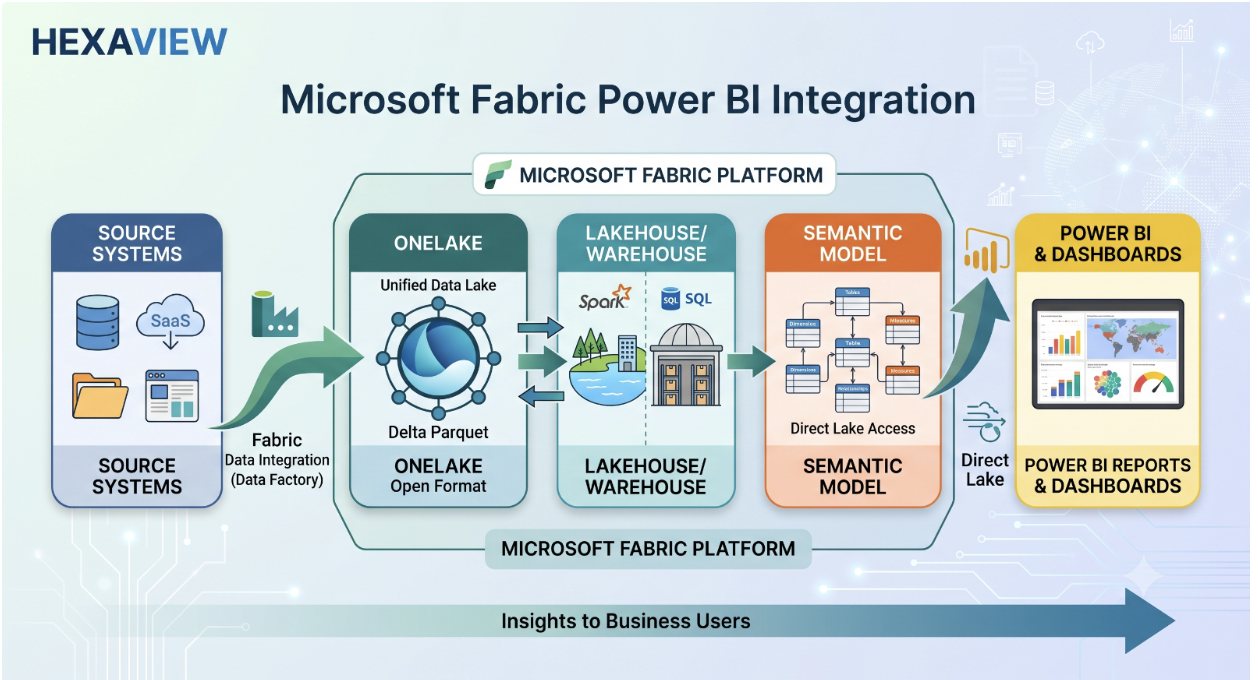
The objective is not simply connecting two products. It is creating a governed analytics architecture where data can move efficiently from source systems to trusted business insights. This approach also supports Power BI Modernization with Microsoft Fabric by reducing fragmented data workflows and centralizing analytical workloads.
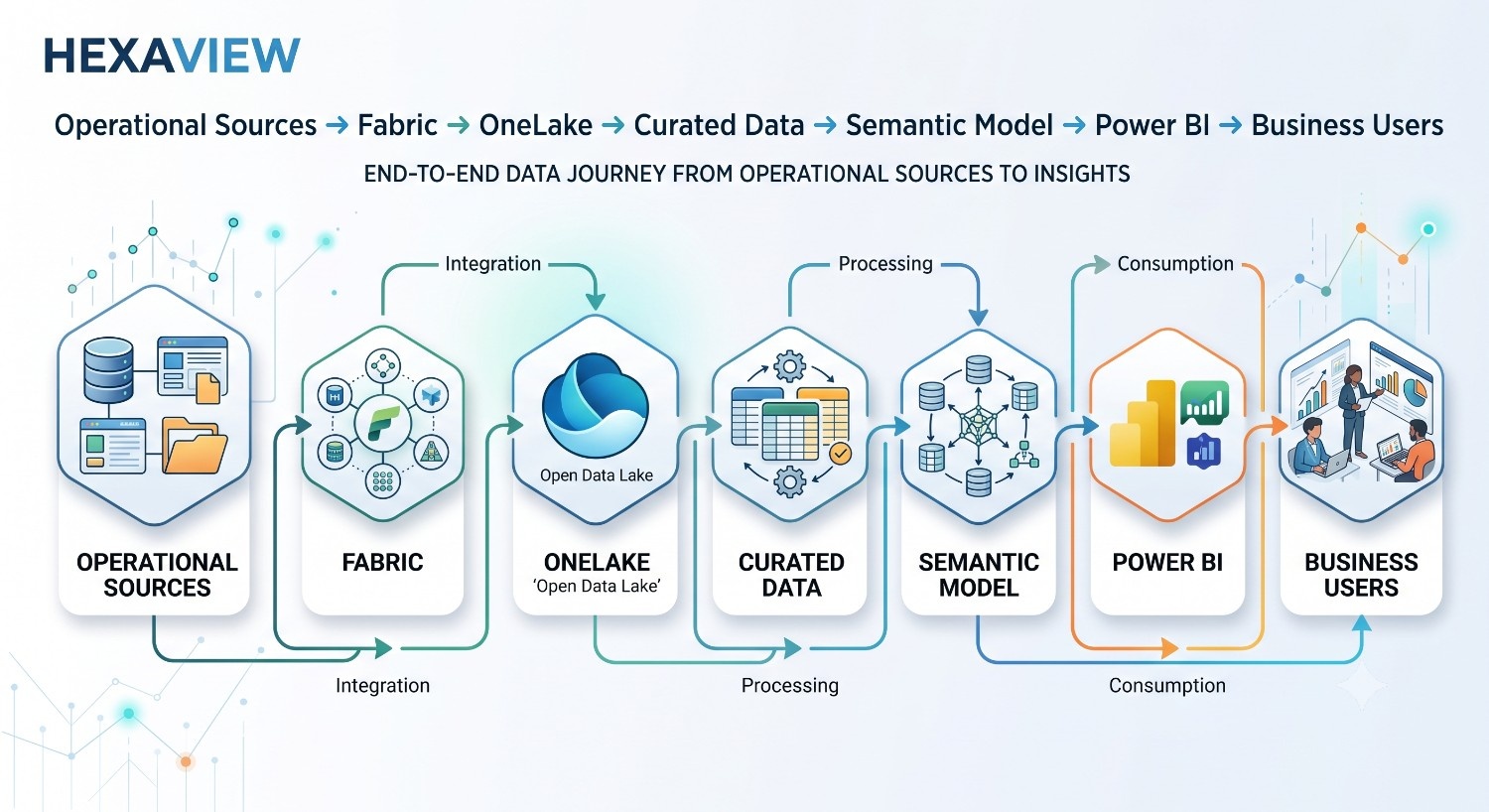
Microsoft Fabric Power BI Integration Architecture connects data engineering, storage, modelling, and reporting into one governed flow.
OneLake acts as Fabric’s unified data lake. Fabric workloads can use shared data without repeatedly copying it between separate analytical stores. Delta tables in OneLake provide the foundation for Direct Lake semantic models and Power BI reporting.
Data Factory pipelines orchestrate ingestion and scheduled movement. Dataflows Gen2 can support low-code data preparation and transformation, while Lakehouse provides a flexible destination for curated data. These capabilities help standardize data before reporting.
The semantic model converts curated data into business-ready structures. It defines relationships, DAX measures, calculations, naming, and reusable metrics. This separates business logic from individual reports and promotes consistent analysis.
Power BI reports consume these semantic models. With Direct Lake, models can access OneLake Delta tables for reporting without traditional data imports.
Inventory reports, semantic models, data sources, refresh schedules, gateways, data volumes, dashboards, security rules, duplicate datasets, and technical debt.
The key question is: Which Power BI assets should migrate, modernize, consolidate, or remain unchanged?
Design the target around workload requirements, not a fixed template. Decide how OneLake, Lakehouse or Warehouse, workspaces, capacity, development and production environments, and governance boundaries should work together. Fabric supports both Lakehouse and Warehouse patterns, with data stored through OneLake.
Connect SQL databases, ERP and CRM platforms, cloud storage, SaaS applications, and existing warehouses. Fabric Data Factory can connect, move, transform, and orchestrate data through pipelines and Dataflow Gen2. Choose ETL, ELT, or a combination based on workload requirements.
Establish landing, transformation, and curated layers before rebuilding reports. Use Delta tables, data-quality checks, naming standards, and reusable datasets. OneLake lets Fabric workloads share data without repeatedly loading separate copies.
Reuse existing models where practical but redesign inefficient ones. Standardize measures, remove duplicated business logic, define relationships, and apply Row-Level Security where required. Keep business logic in governed semantic models rather than embedding calculations across reports.

Microsoft documents Import, DirectQuery, and Direct Lake as semantic-model storage options. Direct Lake on OneLake reads Delta data from OneLake. Direct Lake on SQL can use DirectQuery in scenarios such as views, granular SQL security, or certain guardrails. Direct Lake should not be described as automatically real-time.
Reconcile source and report data, validate measures, test performance and security, confirm refresh behaviour, complete user acceptance testing, and compare dashboards against existing outputs. Resolve discrepancies before deployment.
Use controlled deployment across development, test, and production. Govern workspace access, monitor capacity, pipelines, and semantic models, optimize costs, and track adoption. Fabric deployment pipelines support staged content promotion, while monitoring capabilities provide visibility into workload activity.
Security should be designed before enterprise-wide rollout, rather than added after migration. Microsoft Entra ID provides the identity foundation, while Fabric workspace roles and item permissions control access across workspaces and resources.
Power BI semantic models can use Row-Level Security (RLS) when users require different data views. At the OneLake layer, organizations can also apply granular table, folder, row, and column-level controls.
Sensitivity labels help classify protected content, while data lineage supports impact analysis and traceability. Microsoft Purview can complement Fabric governance and compliance processes. Fabric domains also support business-oriented governance by grouping data around specific organizational areas.
The OneLake catalog now provides governance and security insights, including visibility into sensitivity-label coverage and governance posture.
To improve performance, choose the appropriate storage mode for each workload instead of applying Direct Lake universally. Optimize semantic models by removing unnecessary columns, simplifying relationships, and reducing redundant calculations. Review DAX queries to identify expensive operations and improve measures where necessary.
Optimize Delta tables for efficient analytical access and monitor Fabric capacity for resource pressure. Finally, avoid unnecessary data duplication across Lakehouse, Warehouse, and semantic-model layers. A well-designed Microsoft Fabric Power BI Integration architecture can improve performance, but architecture and workload tuning remain essential.
Does Microsoft Fabric automatically make Power BI faster? No. Fabric provides architectural capabilities for better performance, but results depend on data design, semantic models, capacity, queries, and workload configuration.
Hexaview Technologies also publishes Microsoft Fabric architecture and implementation guidance covering OneLake, governance, data integration, analytics, and enterprise adoption considerations. This provides a practical foundation for organizations evaluating their existing Power BI environment and defining a suitable Fabric roadmap.
Support areas can include:
The approach should align Fabric capabilities with existing workloads, business requirements, governance needs, and long-term analytics objectives.
Use this Microsoft Fabric Power BI Integration checklist before moving into production:
A completed checklist helps teams identify migration gaps before deployment. It also supports controlled Microsoft fabric consulting services by aligning architecture, security, data, reporting, performance, and governance requirements.
.jpeg)
Microsoft fabric implementation services from Hexaview Tech can support organizations moving from fragmented analytics environments toward a governed Fabric architecture. The focus can span Fabric architecture planning, data integration, OneLake implementation, Power BI modernization, semantic model development, and enterprise data governance.
FAQ 1: What is Microsoft Fabric Power BI integration?
Microsoft Fabric Power BI Integration connects Fabric workloads with OneLake, semantic models, and Power BI. It creates a governed path from enterprise data through engineering and modelling to business reporting.
FAQ 2: How does Power BI connect to Microsoft Fabric?
Power BI connects with Fabric through OneLake-based data, Lakehouse and Warehouse workloads, and semantic models. Supported connectivity modes include Import, DirectQuery, and Direct Lake, depending on workload requirements.
FAQ 3: Is Direct Lake better than Import Mode for Power BI?
Not always. Direct Lake suits Fabric-native analytical scenarios using OneLake data, while Import remains valuable for workloads needing cached data and established refresh-based architectures. The right choice depends on workload requirements.
FAQ 4: How does Microsoft Fabric modernize Power BI?
Fabric modernizes Power BI by consolidating data through OneLake, modernizing semantic models, reducing duplicated datasets, and strengthening governance. It also creates a broader data-to-insight architecture around existing Power BI investments.
FAQ 5: How can financial services use Microsoft Fabric with Power BI?
Financial services organizations can use Fabric and Power BI for financial reporting, risk analytics, customer analytics, regulatory reporting, and governed dashboards. Shared data and semantic models can support consistent financial metrics.
FAQ 6: Does Microsoft Fabric replace Power BI?
No. Power BI remains a distinct workload within Microsoft Fabric. Fabric expands the surrounding data, engineering, analytics, governance, and AI capabilities while Power BI continues supporting reporting and visual analytics.
FAQ 7: How long does a Microsoft Fabric implementation take?
Implementation time varies by data sources, existing Power BI estate, migration scope, governance requirements, business domains, and testing needs. A phased assessment should determine the appropriate timeline rather than applying a universal estimate.








.svg)



.svg)