
Microsoft Fabric and Power BI work together as a single unified ecosystem rather than direct competitors. Power BI acts as a powerful visualization and reporting layer, while Microsoft Fabric manages data engineering, warehousing, AI, governance, and analytics. Teams that only need clear dashboards can use Power BI on their own. However, organizations managing complex data ecosystems achieve seamless Microsoft Fabric Power BI Integration. Upgrading your stack enables complete Power BI Modernization with Microsoft Fabric, allowing businesses to scale their data pipelines and make faster, data driven decisions across all departments.
Many organizations believe they must choose between Microsoft Fabric and Power BI. That assumption is incorrect. Power BI continues to exist as a leading visualization tool, while Microsoft Fabric extends Power BI into an end-to-end data platform. Choosing the right path depends on your business maturity, data complexity, and overall analytics goals.
Companies building financial dashboards or simple reports might only need standalone Power BI Modernization with Microsoft Fabric capabilities. However, enterprises dealing with massive data volumes need an integrated environment that covers data engineering, real time analytics, and advanced AI capabilities.
Fabric unifies these disparate tools under one roof, making Microsoft Fabric and Power BI Integration seamless across your whole organization. Instead of forcing a choice, Microsoft designed these tools to complement each other. Power BI handles visual reporting, while Fabric powers the heavy infrastructure behind it.
This guide explains where each solution fits, how they work together, and when businesses should adopt one or both for enterprise reporting.
Microsoft Fabric and Power BI do not compete with each other. Power BI operates as a core reporting workload inside the broader Microsoft Fabric ecosystem. Microsoft Fabric combines several powerful data tools into a unified platform. It includes Data Factory, Data Engineering, Data Science, Data Warehouse, Real Time Intelligence, OneLake, and Power BI.
Think of Microsoft Fabric as a smart office building. Inside that building, Power BI serves as the executive meeting room where teams present insights and make strategic decisions. The rest of the building holds the engines, plumbing, and storage that keep everything running smoothly.
Understanding this relationship helps organizations plan their Power BI Modernization with Microsoft Fabric without replacing existing reports. Fabric manages the background work, while Power BI delivers the front-end visualizations.

This setup ensures that non-technical users keep the familiar Power BI interface, while data teams gain full control over enterprise level pipelines and data storage.
Evaluating Microsoft Fabric and Power BI side by side clarifies how each tool serves different parts of your organization. Power BI excels at creating interactive reports from clean datasets. Meanwhile, Microsoft Fabric manages the underlying infrastructure, transforming raw data into business ready insights across your enterprise.
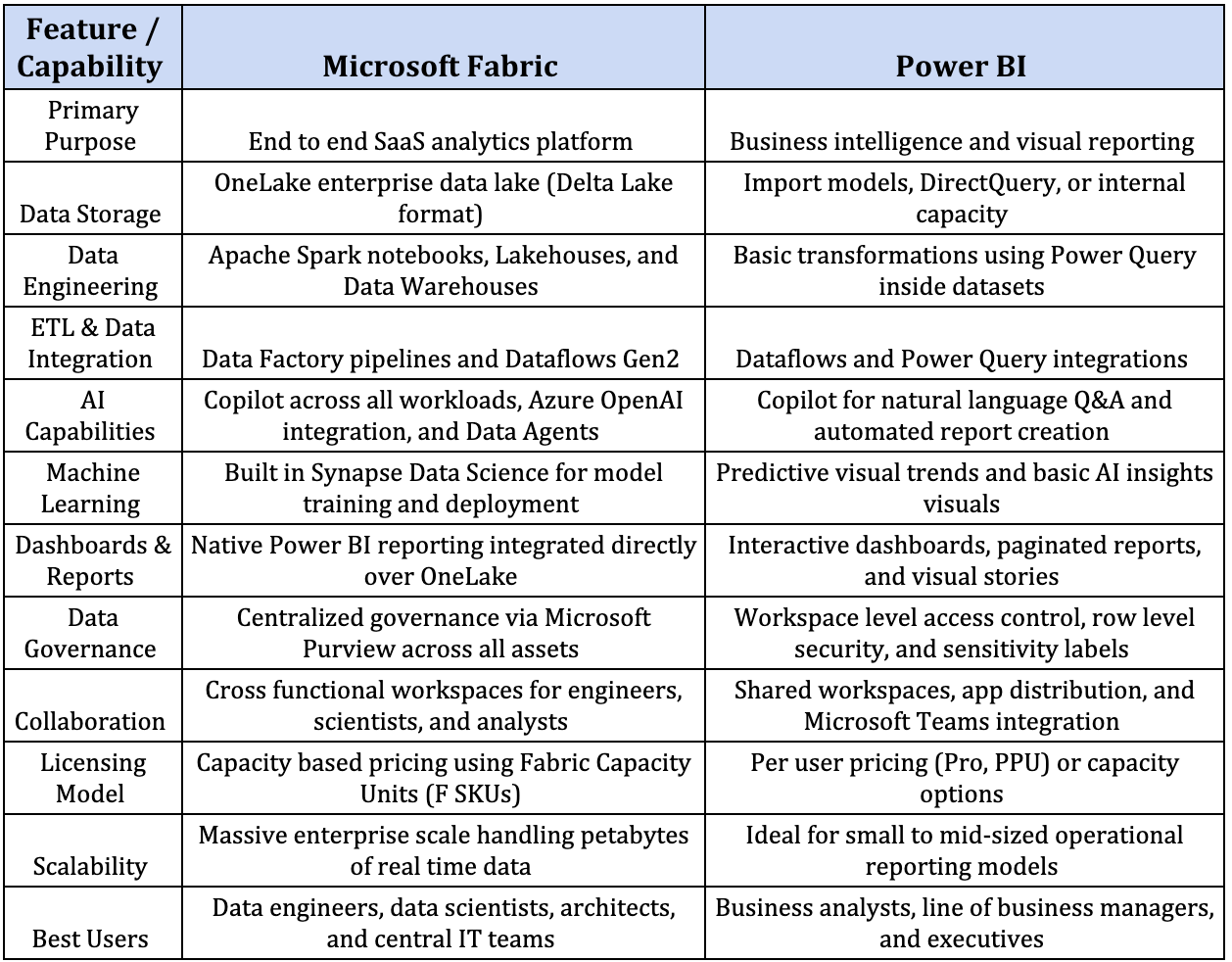
Key Takeaway: Power BI answers specific business questions through interactive visualizations and reports. Microsoft Fabric manages the complete data lifecycle by unifying ingestion, storage, engineering, and reporting into a single platform.
Power BI remains an excellent choice when organizations do not require complex engineering workloads. Finance managers, operations teams, marketing analysts, and small businesses often find that standalone Power BI fully satisfies their analytics needs. It offers a fast, affordable way to transform structured data into clear visuals.
Many small to medium teams stores their operational data in Excel workbooks or basic SQL databases. Power BI connects directly to these files, cleans up the records, and updates visuals automatically without requiring advanced data pipelines.
Power BI allows business users to create intuitive, interactive reports with ease. For instance, a retail store manager can build a sales dashboard that tracks daily foot traffic, regional revenue, and top selling items without writing complex code.
Individual teams often need quick insights tailored specifically to their projects. Marketing teams can analyze campaign performance, while human resources can monitor recruitment pipelines without waiting for corporate IT support.
Organizations can launch Power BI with minimal upfront investment using per user licensing. You get powerful report sharing and interactive visuals while maintaining strict control over software spending.
Even in larger enterprises, standalone tools work well until data volumes grow massively. When leadership requires complex Power BI Fabric integration of financial dashboards that combine live transaction streams, historical ledgers, and predictive cash flow models, teams can upgrade smoothly into the broader Fabric environment.
Large organizations dealing with multiple data sources often outgrow basic reporting tools. Microsoft Fabric steps in as an enterprise level solution, unifying data engineering, real time analytics, and machine learning into a single platform. Built on a Lakehouse architecture, Fabric centers around OneLake, a single organizational data lake that serves as a central hub for all business assets.
Fabric removes data silos by giving every department access to unified storage without copying or moving files. Central IT teams enforce global data governance through integrated Microsoft Purview tools, ensuring compliance while enabling self-service access. Advanced AI tools and predictive analytics run directly over these shared datasets, generating real-time insights from live streaming data.
Practical industry use cases show the power of this unified approach:
Fabric reduces duplicated datasets by using OneLake and shared governance.
Enterprises save massive operational effort with Microsoft Fabric. Data teams no longer spend hours building complex ETL pipelines to shuttle records between separate storage tools, transformation engines, and reporting platforms. Fabric manages the entire data lifecycle in one place, accelerating project timelines from months to days.
Many comparative guides pit these technologies against each other. However, the real value lies in how they operate together. A complete Microsoft Fabric Power BI Integration creates a seamless bridge between deep technical data management and executive decision making.
Power BI sits natively inside Fabric as its primary visualization experience. Teams no longer need to export data or maintain external connection strings. Visualizations run directly on top of enterprise data pipelines within a single user interface.
OneLake serves as the single source of truth across the entire enterprise. Analysts, data engineers, and executives work from the exact same trusted dataset, which eliminates conflicting reports and removes unnecessary data copies.
Direct Lake mode revolutionizes reporting performance. Power BI reads data directly from Delta tables in OneLake without importing records or executing slow DirectQuery calls. Visuals load instantly, even when querying billions of rows.
Microsoft Purview enforces unified security policies across all Fabric workloads. Row level security, sensitivity labels, and access rules applied during data ingestion carry through automatically into final Power BI reports.
Unified AI tools assist every role across the data stack. Engineers generate data pipelines using natural language prompts, while business users generate instant report pages and analytical summaries using Copilot inside Power BI.
Engineers, data scientists, and business analysts collaborate within shared Fabric workspaces. Everyone uses their preferred tools, whether Python notebooks, SQL endpoints, or Power BI desktop, on a single platform.
Finance teams use this integrated environment to monitor live revenue streams, currency updates, and ledger changes. Building Power BI Fabric integration financial dashboards gives executives instant visibility into cash flow without waiting for slow nightly batch updates.
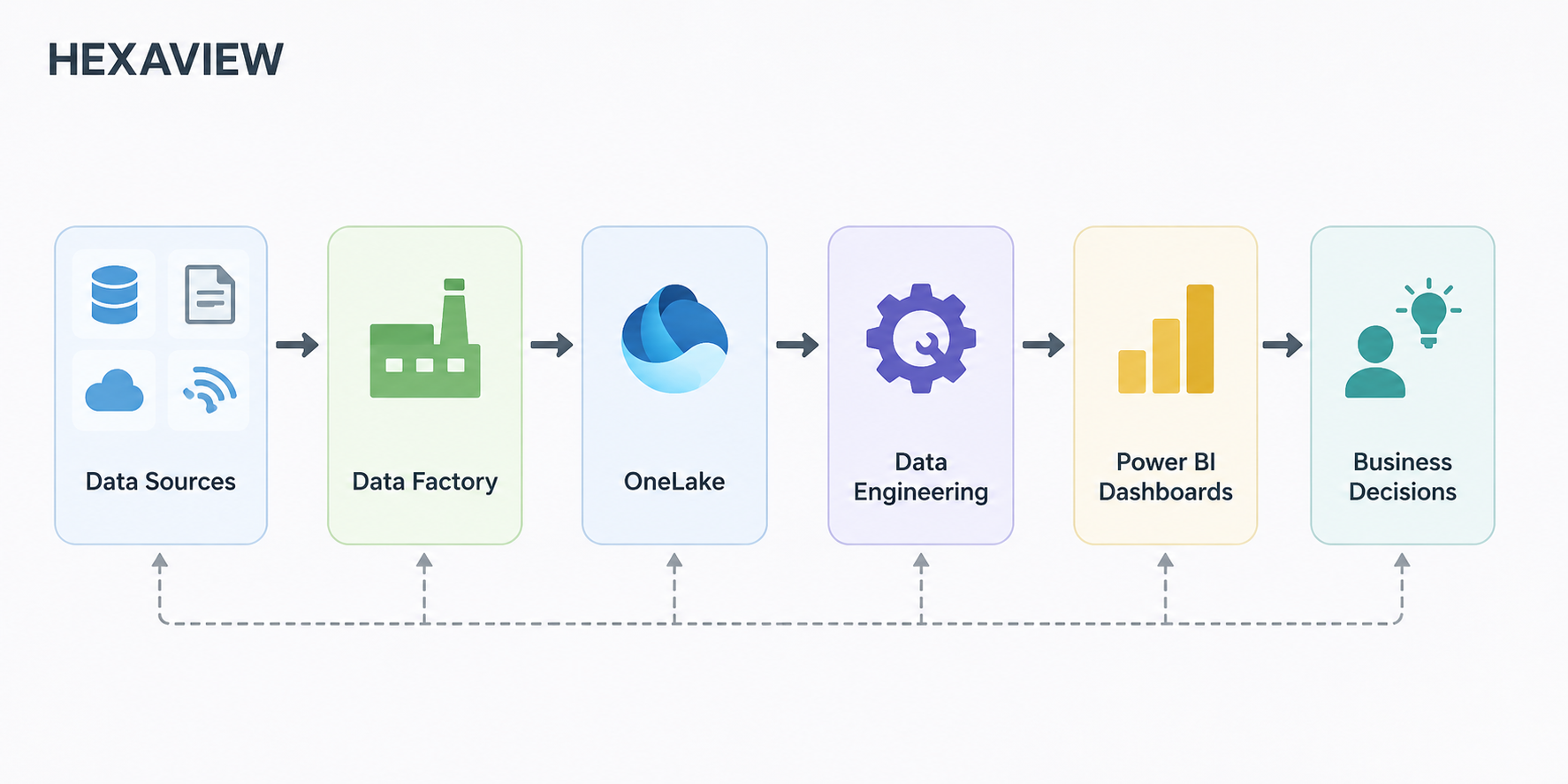
Upgrading your analytics architecture does not require rebuilding existing reports or disrupting operational workflows. Organizations already using Power BI can modernize their stack seamlessly by adopting Microsoft Fabric behind their existing reporting layer.
Power BI Modernization with Microsoft Fabric allows companies to protect their historical report investments while unlocking enterprise grade infrastructure. Existing Power BI reports, semantic models, and dashboards continue to function normally. Fabric simply replaces fragile background processes with unified enterprise capabilities.
By taking a phased approach, organizations upgrade their back-end data engineering without interrupting business users.
Choosing between standalone Power BI and the broader Microsoft Fabric ecosystem depends entirely on your current technical architecture, team capabilities, and data maturity.
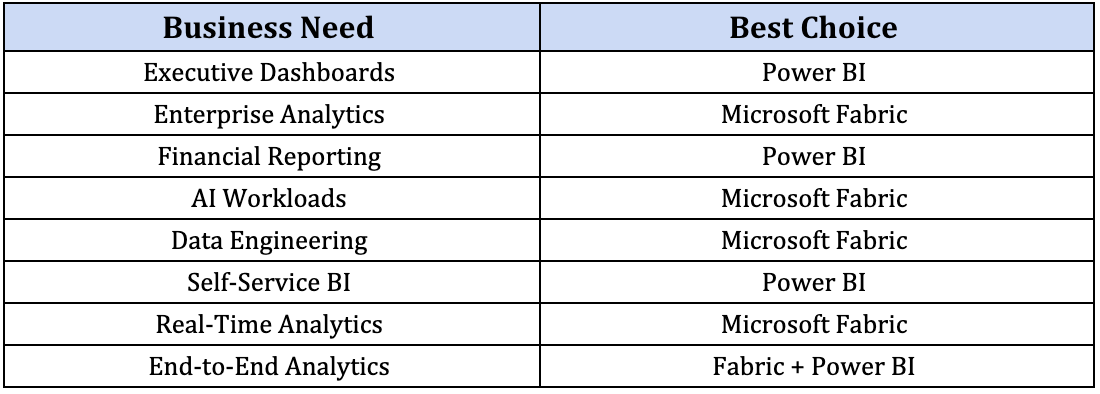
There is no universal winner in this comparison. The right choice depends on your specific business goals, data maturity, and long-term analytics strategy. Teams looking for guidance on architecture, migrations, or data strategies can explore detailed insights on the Hexaview blogs.
Microsoft Fabric and Power BI are designed to complement each other rather than compete. Power BI remains an essential tool for business intelligence, dynamic reports, and executive dashboards. Meanwhile, Microsoft Fabric expands these capabilities by providing a broader enterprise platform for data engineering, Lakehouse storage, real time streams, and advanced machine learning models.
Organizations must evaluate their current data complexity and long-term analytics goals before making major infrastructure investments. Modern enterprises achieve the highest value by combining both technologies into a single unified analytics ecosystem rather than replacing one tool with the other.
Navigating this transition requires experienced technical leadership from Microsoft Fabric consulting companies. Hexaview Technologies empowers global organizations as a trusted Microsoft Fabric agency, delivering tailored consulting, migration, and Power BI optimization services. Their certified experts help enterprises accelerate implementation timelines, streamline compliance, and build future ready, AI-driven data ecosystems.
Ready to modernize your analytics stack? Connect with the data engineers at Hexaview Technologies today.
1. Is Microsoft Fabric replacing Power BI?
No, Microsoft Fabric is not replacing Power BI. Power BI remains available as an independent business intelligence tool while also functioning as the primary reporting workload inside the broader Microsoft Fabric suite. Microsoft continues to support standalone Power BI deployments alongside Fabric integrations.
2. Can I use Power BI without Microsoft Fabric?
Yes, organizations can easily run standalone Power BI. Small to medium teams that only require interactive dashboards, standard report sharing, and simple data transformations through Power Query do not need to purchase Microsoft Fabric capacities.
3. Does Microsoft Fabric improve financial dashboards?
Yes, Fabric transforms report performance through Direct Lake mode and OneLake storage. Implementing Power BI Fabric integration financial dashboards allows financial analysts to query millions of ledger entries in real time, eliminating slow import refreshes while giving executives live visibility into cash flow.
4. Is Microsoft Fabric suitable for small businesses?
Microsoft Fabric depends more on data complexity than company size. Small businesses with simple reporting needs usually stick to standalone Power BI. However, if a growing business handles complex multi-source ingestion, IoT streams, or machine learning models, adopting Fabric provides an agile foundation.
5. What is the biggest advantage of Microsoft Fabric Power BI Integration?
The primary advantage lies in unifying storage and governance without duplicating data. Connecting Power BI directly to OneLake using Direct Lake mode allows teams to build high-performance visuals directly over raw delta tables while enforcing centralized security policies through Microsoft Purview.
6. Do existing Power BI reports need rebuilding after moving to Fabric?
No, existing Power BI reports do not require rebuilding. Microsoft Fabric offers complete backward compatibility, allowing legacy semantic models, DAX measures, and dashboards to function smoothly while back-end data storage and ingestion pipelines upgrade gradually.
7. Should enterprises modernize Power BI with Microsoft Fabric?
Yes, enterprises benefit greatly from upgrading their data stack. Power BI Modernization with Microsoft Fabric prepares organizations for future analytics growth by providing unified governance, real time streaming capabilities, enterprise scalable lakehouses, and integrated Copilot AI assistance across all data operations.






.svg)



.svg)